CLUX: A Roast-Proof Scorecard for Your Sad Little CLI
Having designed, audited, and created guidelines for command-line interfaces over the past six years, the most common question I get is: “What makes a good CLI?”
The annoying, consultant-brained answer is: it depends. Not because I’m dodging the question, but because “good” depends entirely on who OR what is running the command. A CLI that delights a human can absolutely wreck a CI pipeline, and vice versa. Anyone who tells you there’s One True Way to design a CLI is either selling something or has never had to grep their own error messages at 2am.
Here’s the real problem, though: in GUIs, designers get analytics, heatmaps, session recordings…an entire surveillance apparatus dedicated to catching you the moment you rage-click. The terminal offers none of that mercy. Bad CLI UX is basically invisible, which means it festers. Roughly 88% of users won’t file an issue when your tool confuses them. They just quietly ghost you and go install the competitor. No breakup text, no feedback form - just silence, and a brew uninstall.
Defining quality in the terminal (no, vibes don’t count)
There’s no universal blueprint for a perfect CLI, but “ease of use” isn’t a mystery either. It comes down to three criteria you can actually measure instead of guessing:
| Criteria | What it asks |
|---|---|
| Learnability | Can a human find your commands without spelunking through the source? Does --help actually help? |
| Efficiency | Shortcuts, pipe-friendliness, --json output - or does every interaction cost the user three extra flags and a prayer? |
| Error Tolerance | When it breaks (it will break), does the tool tell the user why and what to do next - or just hurl a stack trace and call it a day? |
Beyond those three, I also weigh four more criteria that matter just as much, even if they get talked about less:
| Criteria | What it asks |
|---|---|
| Pleasantness | Is the naming consistent, is the output formatted like someone thought about it - or does every subcommand feel like it was designed by a different committee on a different decade? |
| Safety | Is there a --dry-run? Does anything destructive make you confirm first? Or can one fat-fingered flag delete prod before you’ve finished your coffee? |
| Security | Where do credentials go — a .env, a config file with sane permissions, a secrets manager? Or straight into your shell history and every process list on the box? |
| Accessibility | Does it work with --no-color and screen readers, or does it assume everyone’s staring at a high-contrast terminal on a 4K monitor with perfect color vision? |
The plot twist: all seven of these criteria fight each other depending on who’s on the other end. A confirmation prompt (Are you sure you want to delete this? [y/N]) is thoughtful error tolerance — and great safety — for a human hovering over the delete button, and an absolute pipeline-killer for a script that just wanted to run unattended at 3am. Design for one, betray the other. This is the tension every CLI eventually has to pick a side on.
Automating the UX audit with CLUX
Manually auditing every command against a pile of usability heuristics is the kind of tedious that makes you question your career choices. So instead of doing that by hand forever, I built CLUX (CLI UX Evaluator): an open-source scoring system that benchmarks how usable your CLI actually is, so you don’t have to rely on vibes, Slack polls, or the one loud user who emails you in all caps.
→ Try the live prototype → View the project on GitHub
No more guessing whether a command is well-designed or a war crime. Paste your CLI’s --help output - or a raw command result - into CLUX and let it do the judging for you. Here’s how it works:
- Contextual weights: Tell it whether your CLI is built for humans or for scripts, and the scoring shifts accordingly — because CLUX isn’t naive enough to hold a
curl | bashpipeline to the same manners as a first-time user. - Heuristic breakdown: It scores your output across eight dimensions - learnability, error tolerance, efficiency, safety, UNIX compliance, and accessibility (yes, your neon-green-on-white output is an accessibility problem, not a “brand choice”).
- Custom standards: Got an internal CLI style guide gathering dust in a wiki nobody reads? Paste it in and CLUX will check your tool against it too — so your “guidelines” can finally do something besides exist.
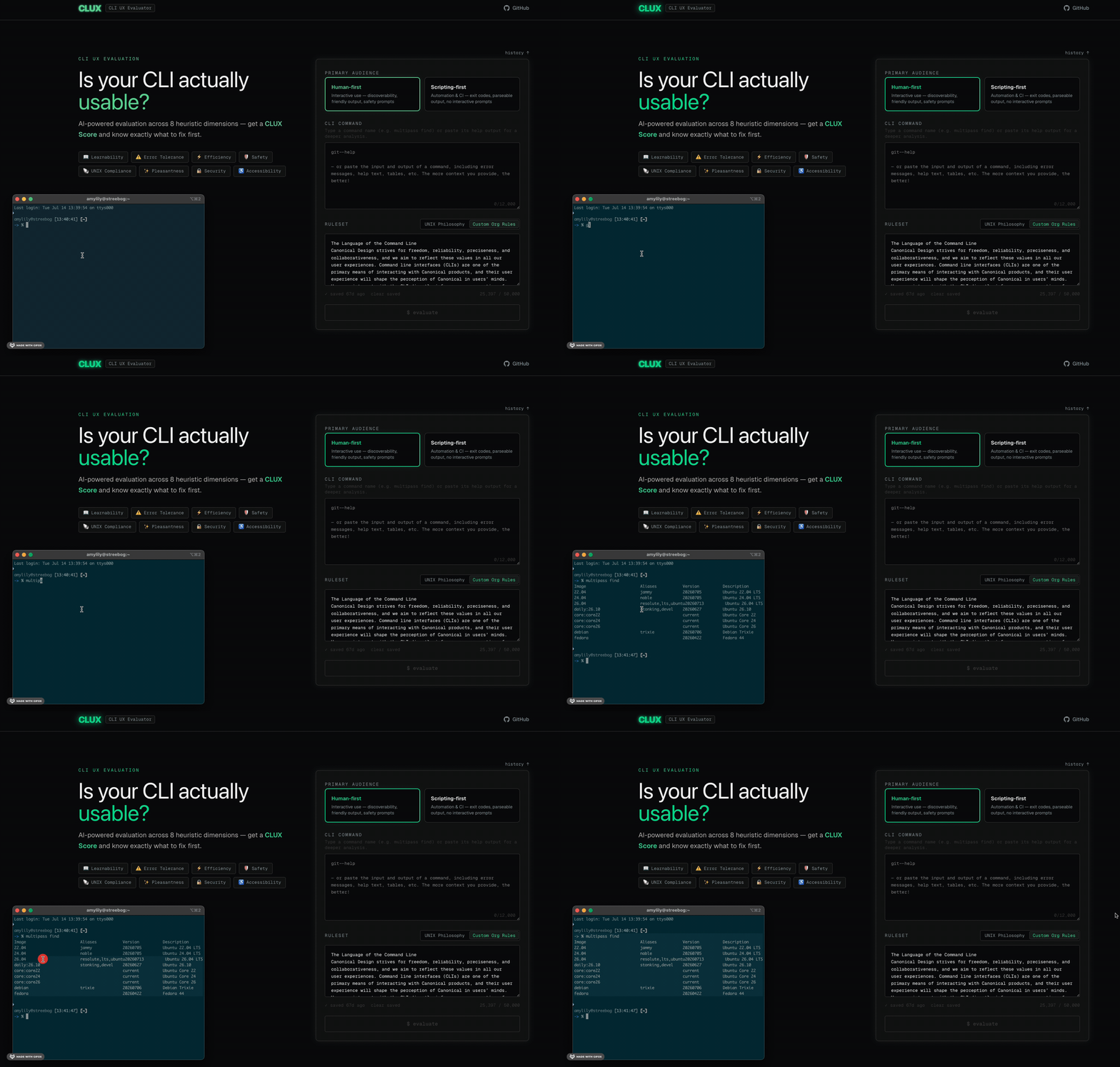
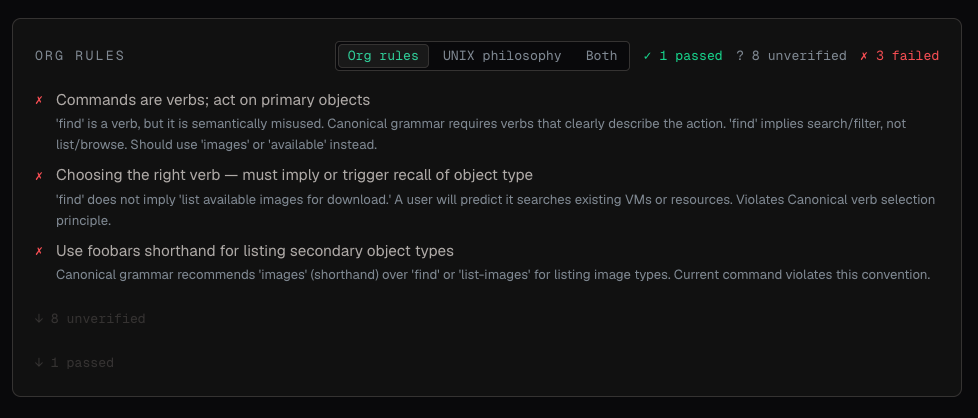
Every org has that one CLI style guide nobody follows - the fifteen-page doc about consistent flag naming that gets cited once in onboarding and never opened again. CLUX lets you upload it as a custom rule set, so instead of policing consistency in code review with a link nobody clicks, the scorecard enforces it for you. Required --dry-run flags, banned emoji in output, whatever naming convention your team argued about for two hours in a meeting that could’ve been a Slack message - CLUX will hold every CLI in your org to it, automatically, every time, without getting tired or petty about it.
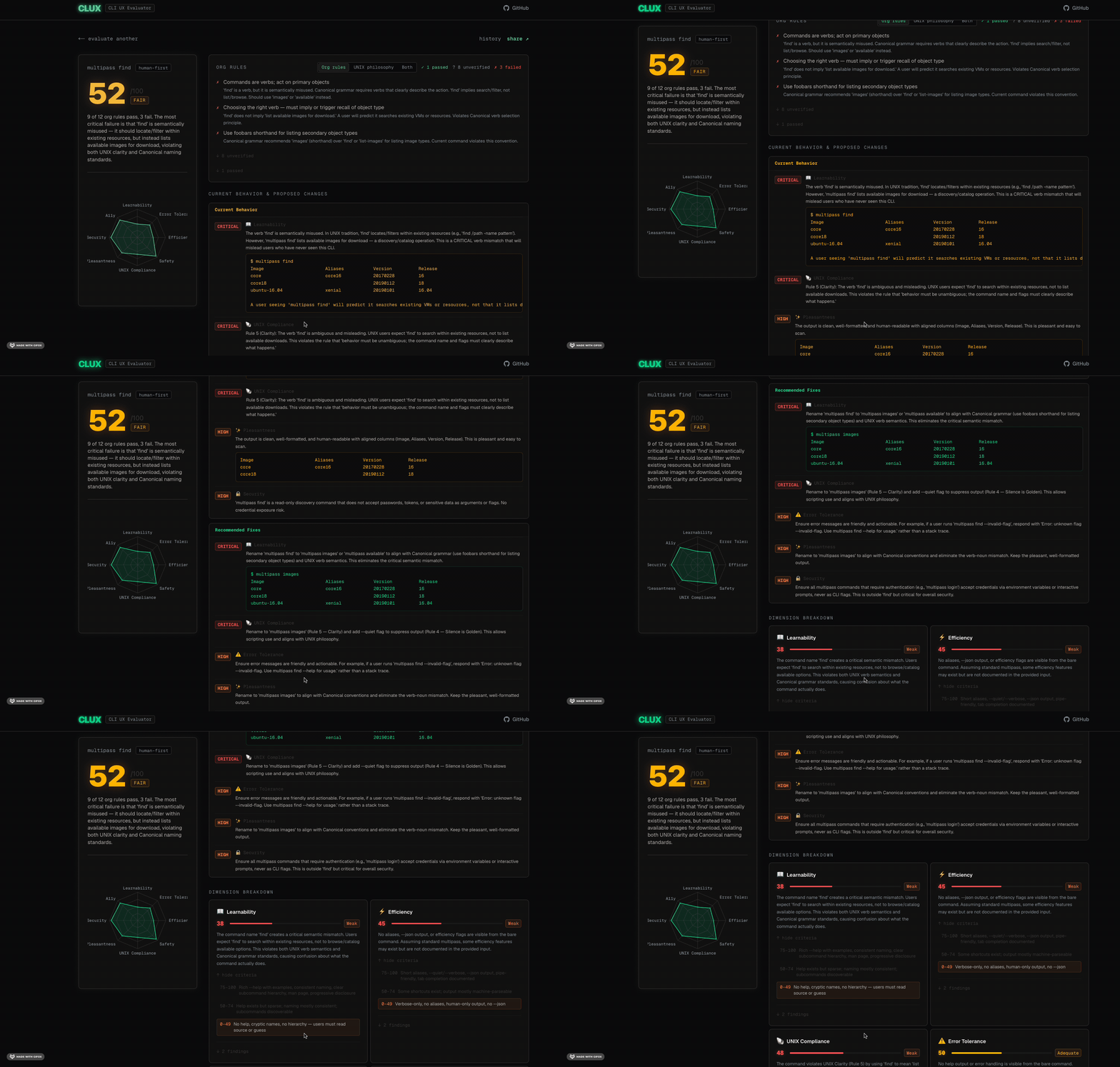
Comparison and recommendations
This isn’t a smug checklist that just tells you “bad” and walks away. It’s meant to teach why something is bad, using real usability heuristics instead of hunches. It flags friction points and hands you actionable fixes, ranked by severity, so you know whether to panic now or add it to the backlog you’ll never revisit.
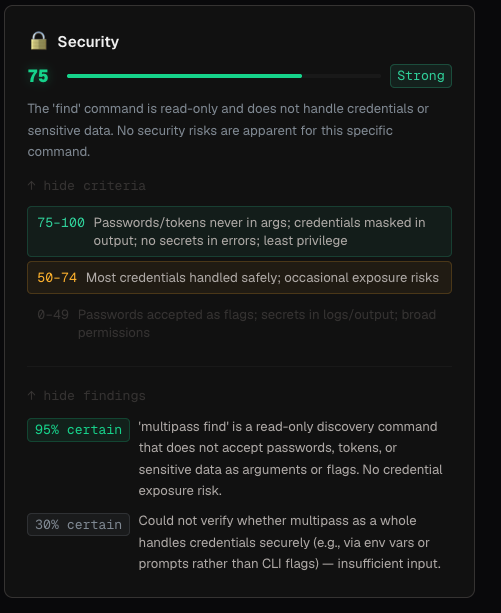
A note on human judgment (a.k.a. don’t get lazy)
CLUX has a confidence score baked in, and it’s there on purpose to be a little annoying. We all have a tendency to get cozy with AI output and start nodding along without reading closely — the confidence score exists specifically to interrupt that. It’s a nudge to actually review the suggested fixes and apply your own judgment, instead of treating an AI’s opinion of your CLI as gospel. The machine can flag the smell; you still have to decide if it’s worth fixing.
Try it out
If you want to put your own CLI on trial, the project is on GitHub. Clone it, plug in your own API tokens (Anthropic, Google, or Kimi), and run it locally — no excuses left for shipping another CLI that only its creator can use without crying.
Tools & Tech: Next.js, Vercel AI SDK, Supabase, Recharts, shadcn/ui
Keywords: Command Line UX, Developer Experience, CLI Heuristics, Usability Auditing, AI-assisted Evaluation