The new MAAS CLI that changes Ubuntu CLI Guideline
Context:
MAAS (Metal-as-a-service) is Canonical’s bare-metal provisioning tool. The CLI was originally created for machines to interface with machines via the Foundations Cloud Engine (FCE) making it difficult for human to use. Over time, users either abandoned the CLI or built their own wrappers — indicating a breakdown in usability and trust. We set out to reimagine what a CLI could feel like when designed with empathy, efficiency, and accessibility in mind.
Role:
As the Lead UX Designer, I was tasked with one deceptively simple goal:
“What makes the MAAS CLI more intuitive.”
What followed was a full redesign: reshaping how people interact with complex infrastructure through the CLI.
🎯 Goals
Focus Values:
- Learnability: Scaffold new users with interactive prompts
- Efficiency: Simplify workflows for power users
- Error tolerance: Clear, actionable feedback and recovery
- Accessibility: Work across all terminal themes
Constraints:
- Color themes vary widely in terminal setups
- Command structure changes would break existing user scripts
- Real-time states (e.g. commissioning/deploying) are hard to track without blocking prompt
- Some waiting states are indeterminant, meaning we cannot predict if a task will be done.
- Displaying run-time and elapse time can be a challenge when dealing with timezones and server time.
- Terminal size can affect the indentation of the output.
Problem:
The MAAS CLI was built as a thin wrapper around the MAAS API.
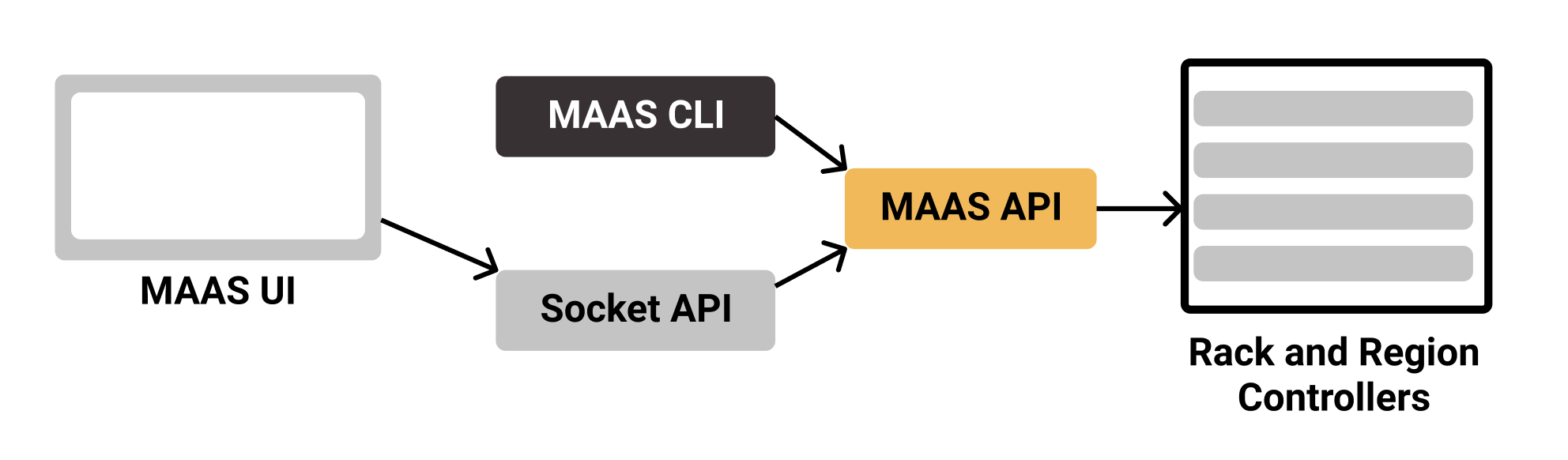
While functional, it wasn’t user-friendly:
- Opaque Sythetic IDs for Objects: Users had to memorize system IDs not visible in the UI.
For example, if a user tries to get information of one machine, they need to find the [SYSTEMID].
>$ maas admin machine read [SYSTEMID]
To get the SYSTEMID, the user need to either copy the ID from the URL or using jq.
>$ maas admin machines read | jq '.[] | .hostname, .system_id'
The output of the machine read is as below:
It returns 82 lines in JSON format, showing information of one machine.
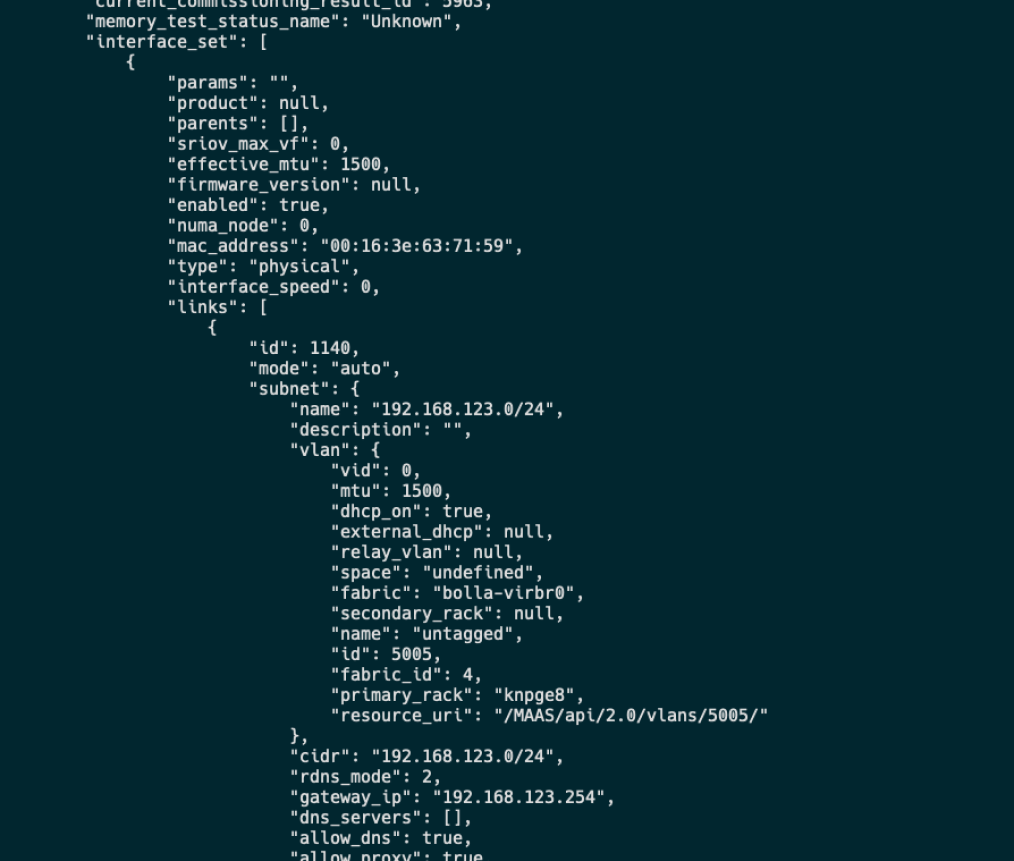
While this is convenient for machines to process, they are not easily processed by humans.
Other problems include:
- Poor learnability: Flags and commands weren’t self-explanatory or discoverable.
- Unfriendly human-friendly outputs: Responses came back in raw JSON.
- Error messages: No support for error recovery or readable output.
- Inefficiency at scale: Bulk actions required scripting, not native support.
- Low accessibility: Color cues didn’t render properly in many terminal themes.
- No waiting state: None of the commands display any waiting state when things are processing, so the user needs to keep pinging to see if it’s done.
Week 1-2: Research & User Modeling
End-to-end UX process from research -> prototype -> internal testing.
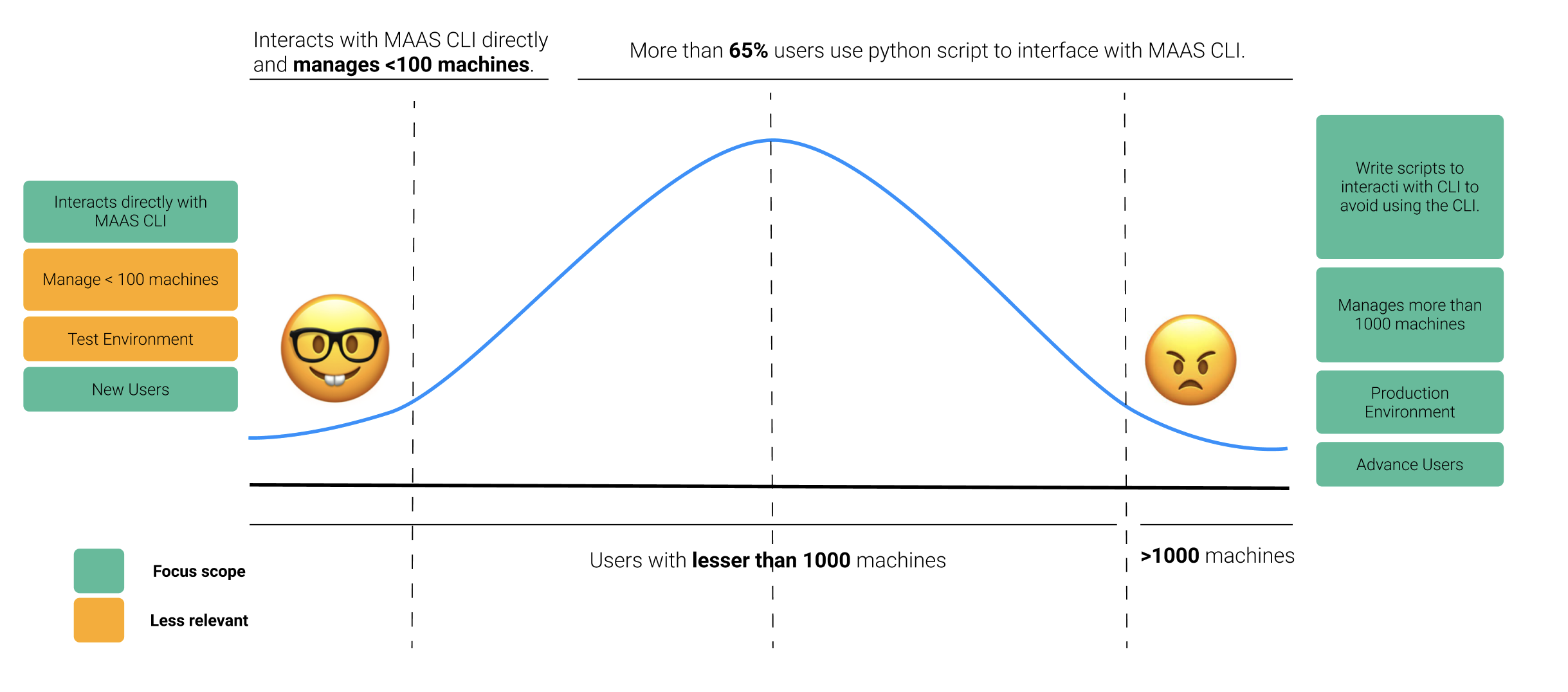
Interviewed internal Canonical Engineers across teams who are MAAS user and mapped out usage patterns.
| User Type | Behavior |
|---|---|
| Extreme Users | Use CLI directly, script around missing features. |
| Beginners | Drop out quickly, avoid the CLI. |
| Support Engineers / Field Engineers | Need quick, readable outputs to debug. |
Key insights:
- 65% wrote custom scripts to bypass core UX flaws.
- Even power users struggle with inconsistent singular/plural patterns.
- 80% uses dark theme terminal.
- The
--helpflag caused more confusion than clarity. - System IDs are difficult to obtain (not UI-visible).
- JSON outputs are unreadable without post-processing.
- 4 out of 5 users prefer waiting states when something is processing.
🧠 Focus Areas
Six targeted improvements to make MAAS CLI faster, friendlier, and more resilient.
🛠️ Prototype (Weeks 3–4)
Developed a new CLI prototype in NodeJS using CommanderJS and InquirerJS.
(Visit the prototype)

Before
To read all machines in MAAS
>$ maas admin machines read
After
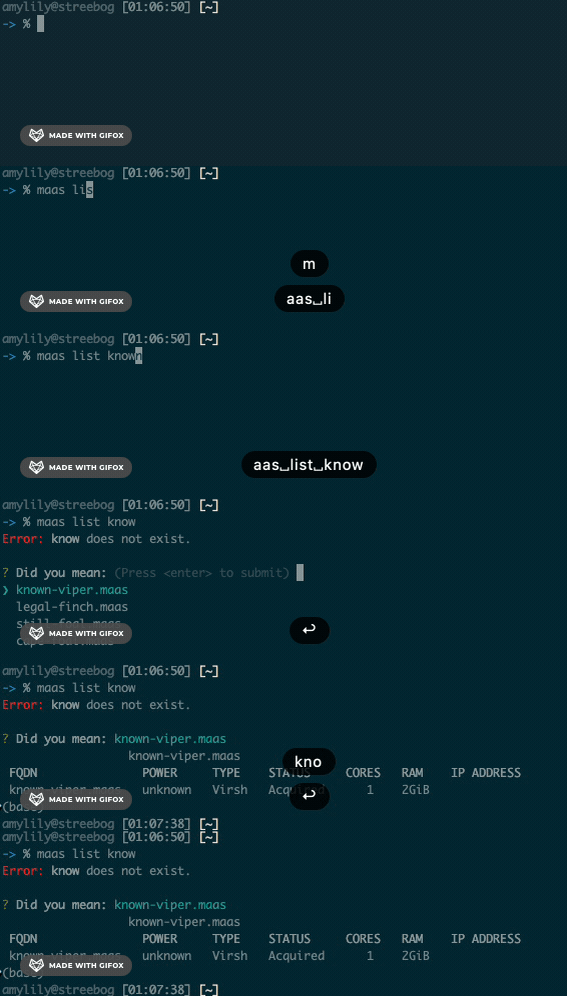
>$ maas list
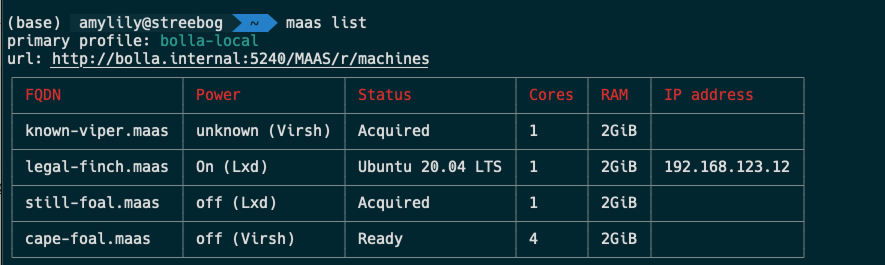
Listing one machine with a typo
Auto-suggestions for typos (did you mean...?)
>$ maas list [MACHINE NAME]
The command will search for the nearest neighbor and provide suggestions.
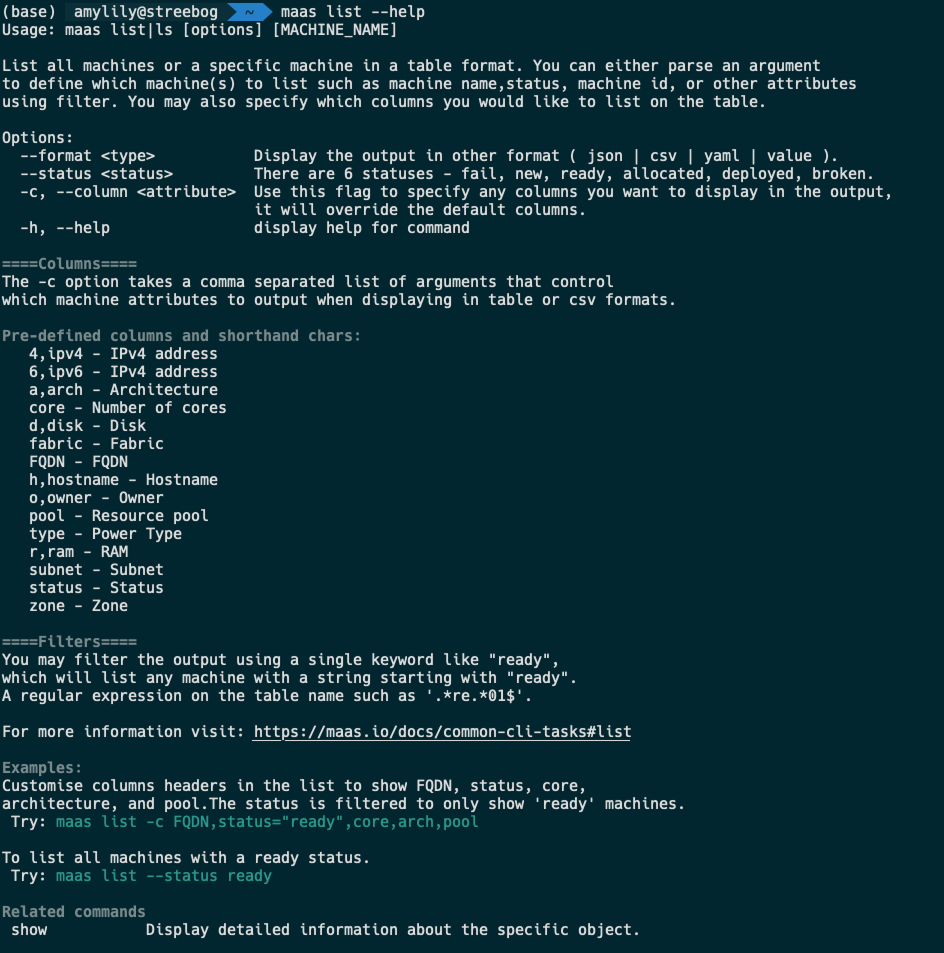
Command’s man page
Helpful --help output with structured layout and man-page style info
--format: change output to table (default), json, csv, etc.
Waiting States
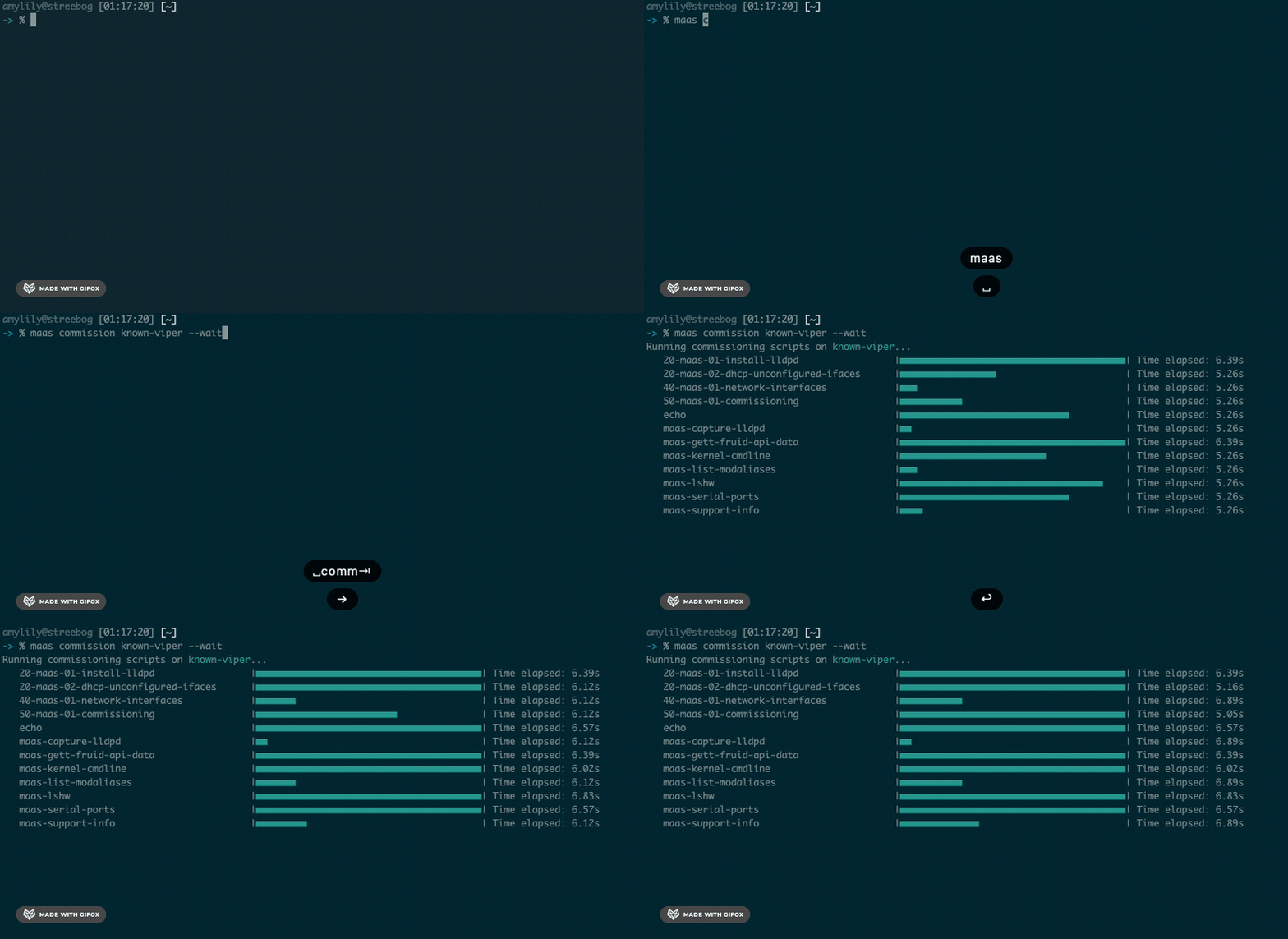
There are two types of waititng states, parallel waiting state and progressive waiting state.
The --wait flag block prompt for real-time progress (commission/deploy)
Parallel Waiting state
During commissioning, most tasks are done in parallel.
Progressive Waiting state
During deployment, most tasks are done in a progressive manner.
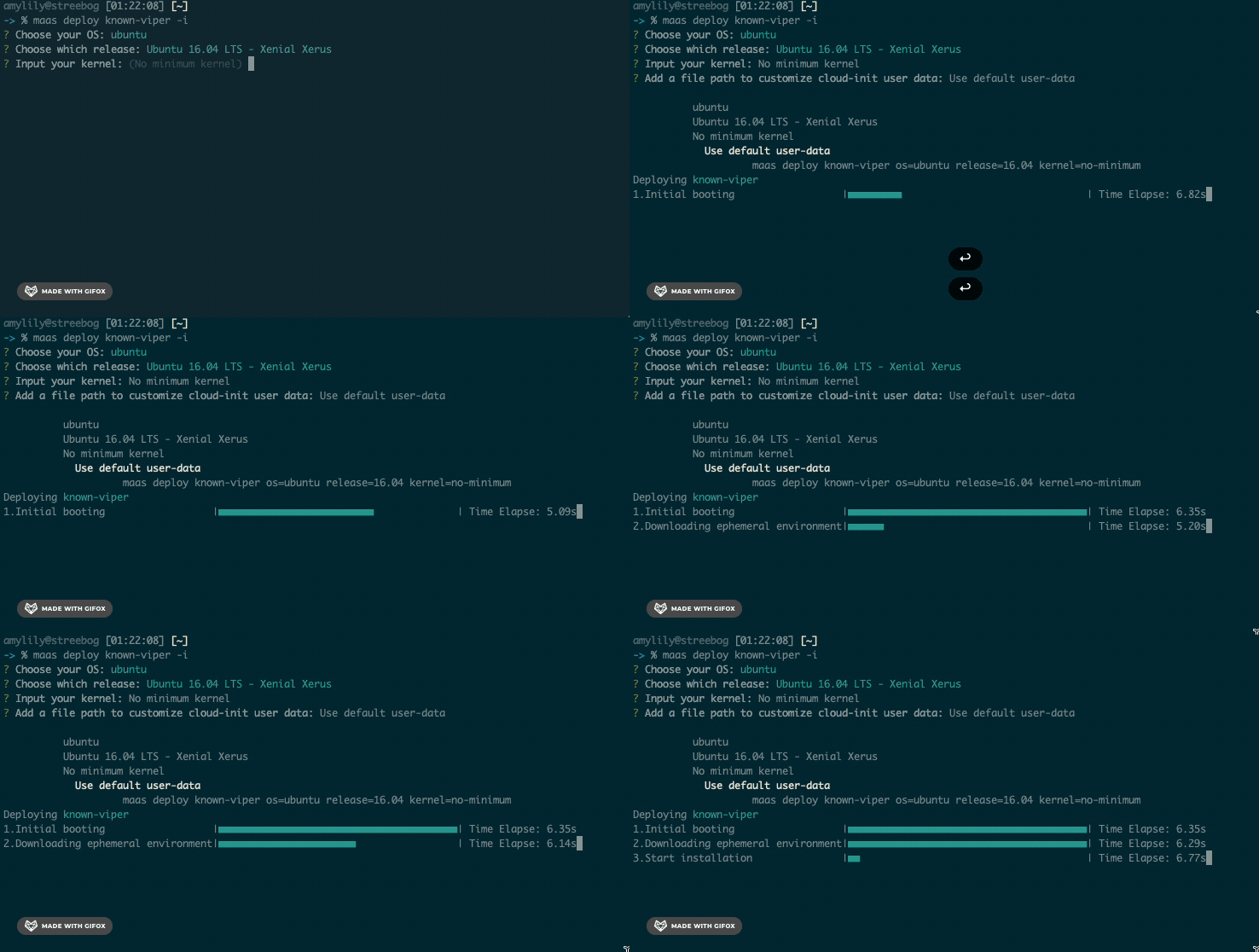
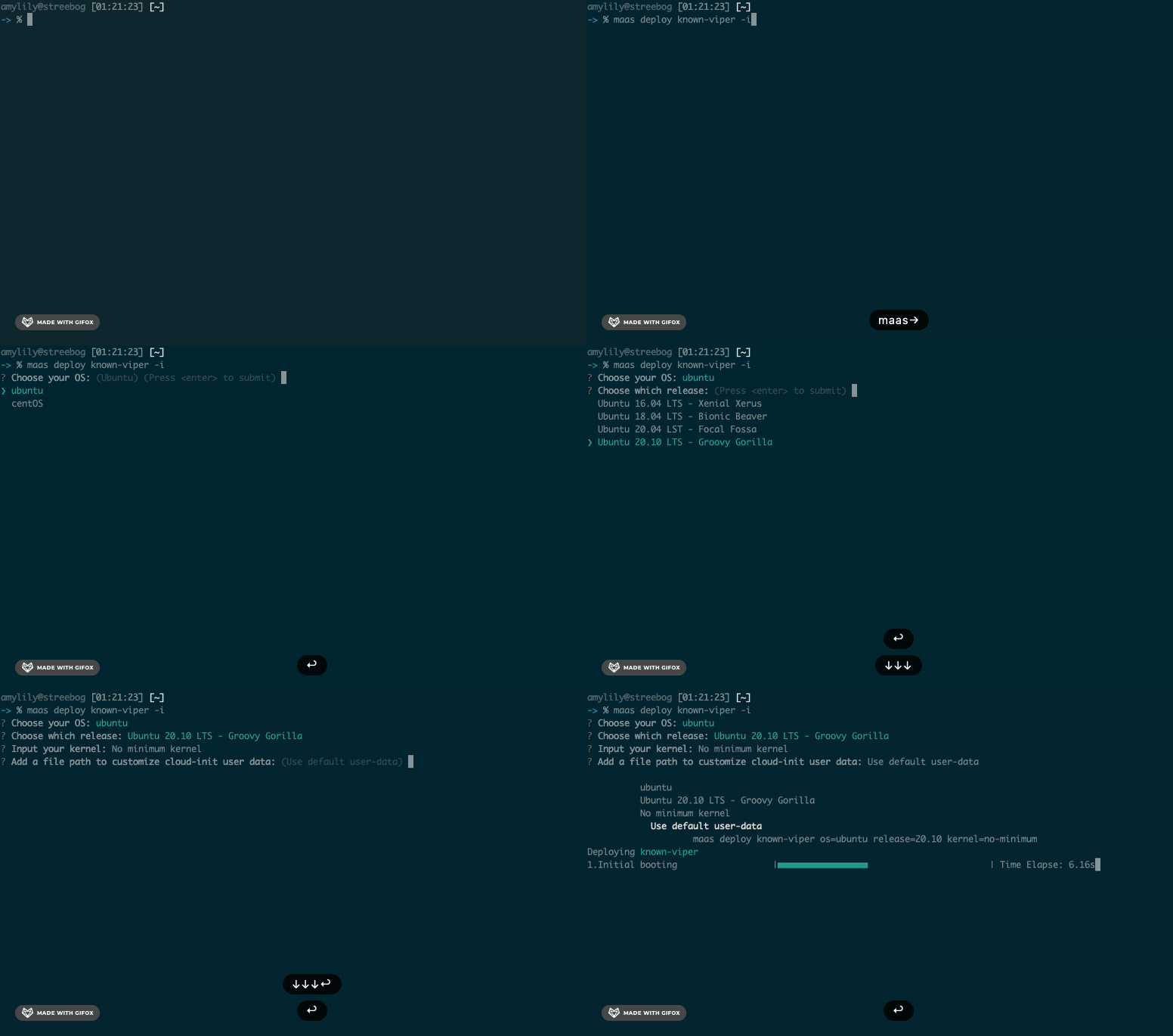
Interactive prompts
We introduce the interactive prompt as a way to help users add incomplete requirements when deploying machines, the command also provides an equivalent command when the use wants to skip interactive mode.
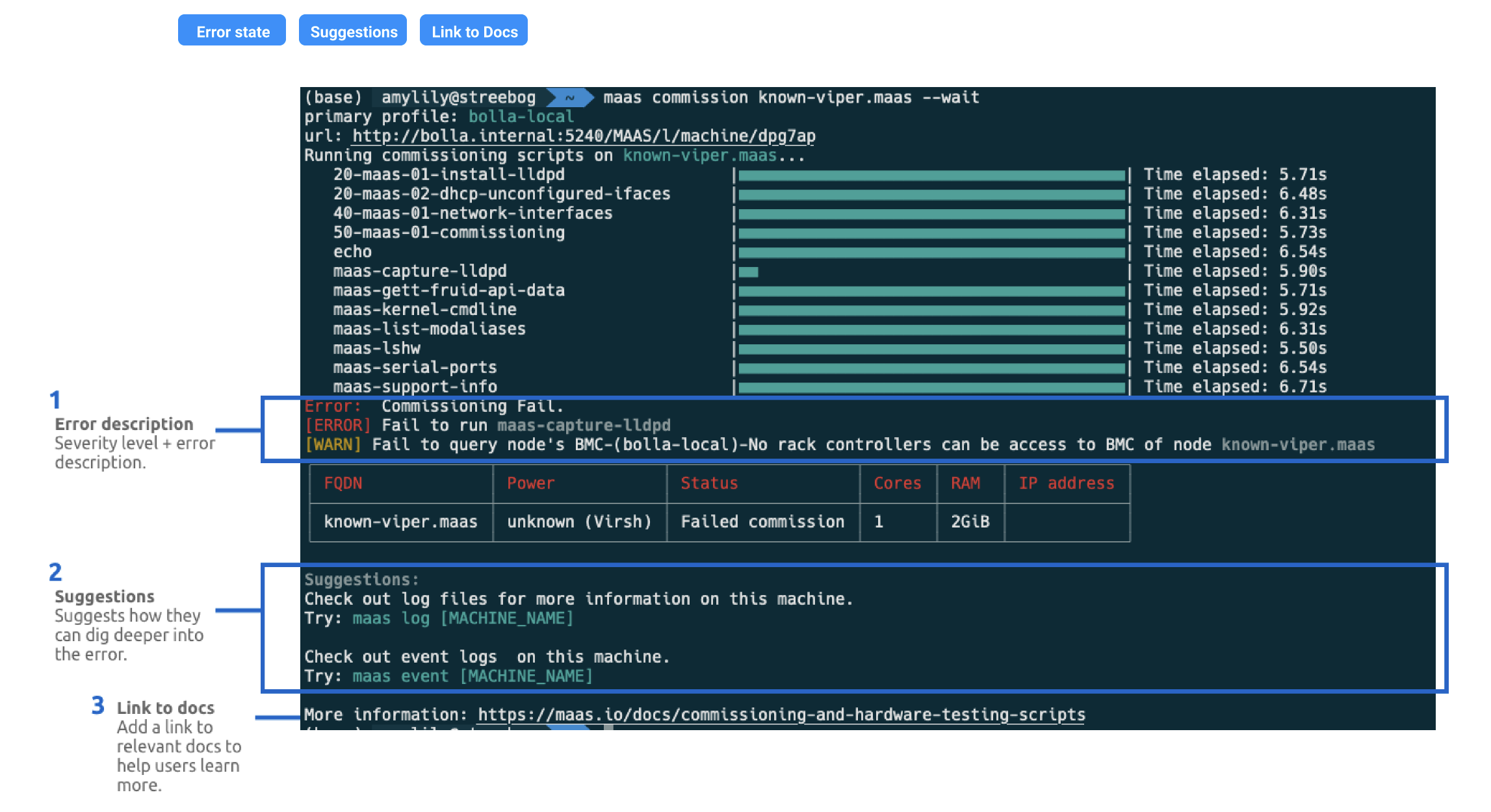
Smart Error recovery (error codes, suggestions, direct doc links)
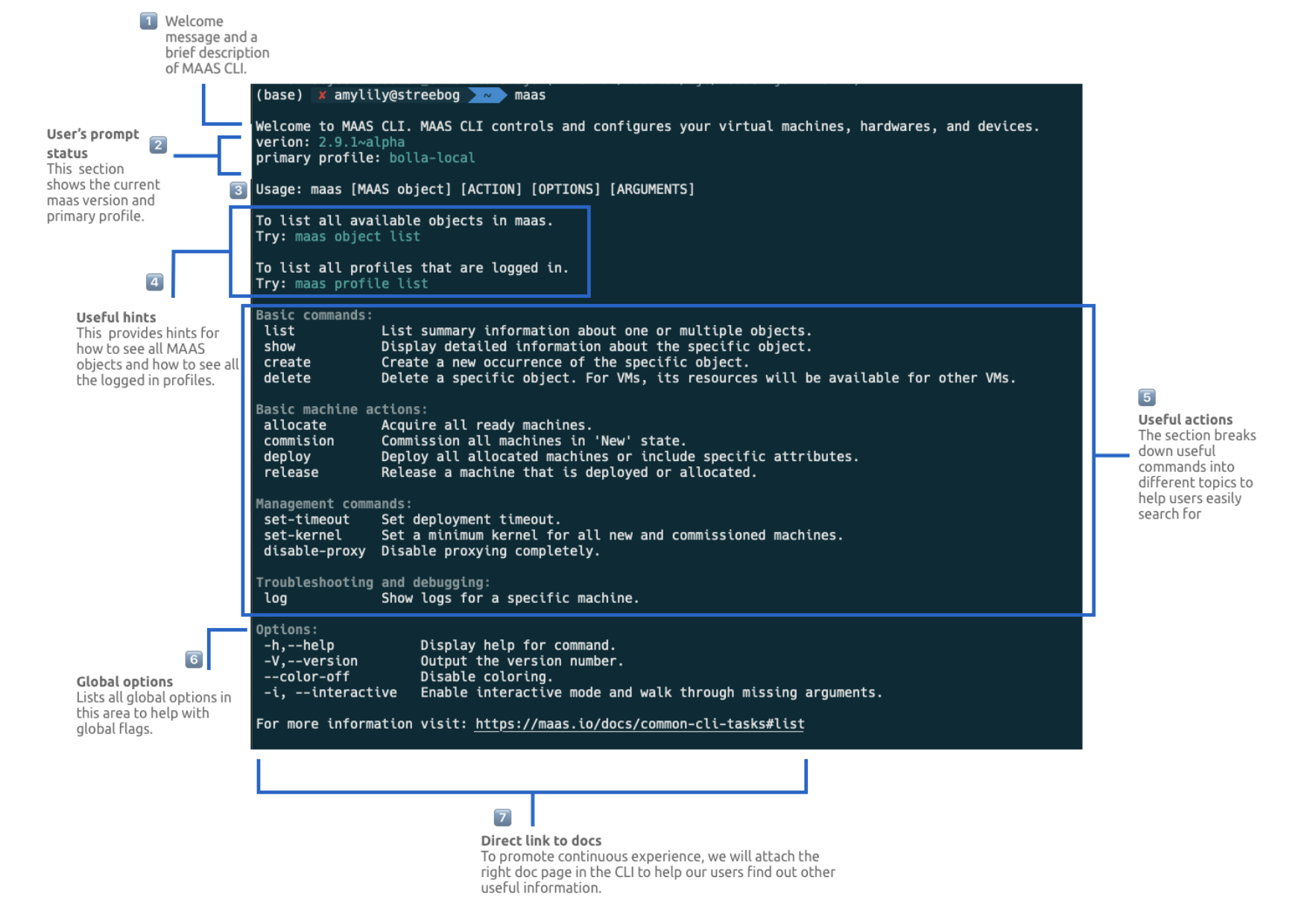
Zero State:
When typing maas alone:
Show quick tips, common commands, and link to docs
🔁 Testing & Feedback (Weeks 5–6)
Tested with 12 internal users + shared prototype in Discourse community with feedback.
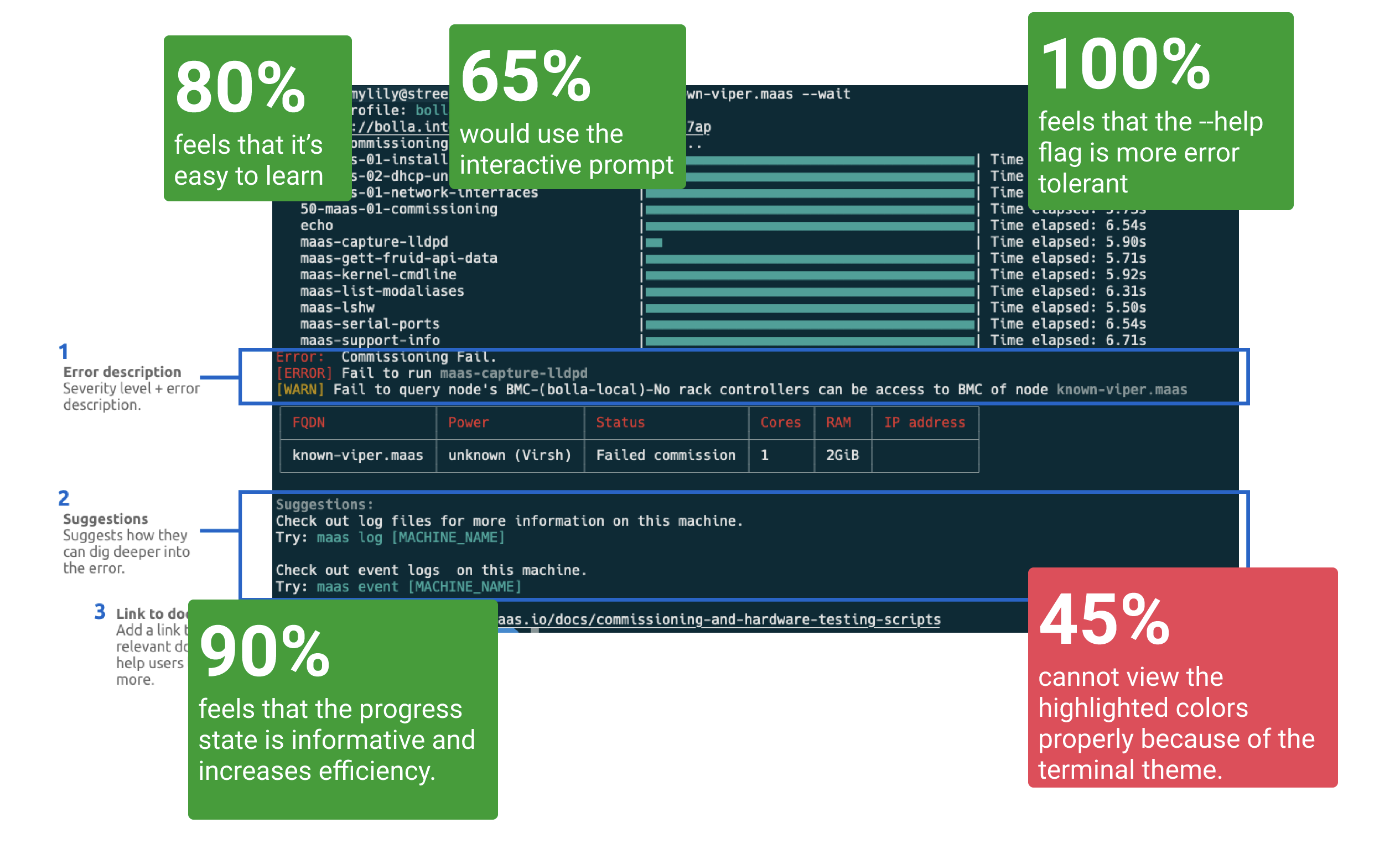
Results:
- 80% found new CLI easier to learn
- 100% preferred the new interactive prompt
- 90% said error tolerance and help flags improved workflow
- 45% had trouble seeing color cues due to terminal theme
📌 Learnings & Next Steps
- Terminal color themes can obscure visual cues — future design needs theme-agnostic cues
system_idreliance still creates friction; improving discoverability of object IDs remains key- Command structure must support tab completion and bulk action patterns
Rollout Plan:
This was Phase 1 (exploration + prototype). Further testing is needed with enterprise users and external community contributors. Future phases:
- Usability validation with real-world scripts
- Integration with existing MAAS tooling
- CLI documentation and discoverability updates
🧵 Reflections
This project shows the power of treating CLI design with the same UX depth as graphical interfaces. By surfacing real user pain points and applying interaction design principles to a technical surface, we created a CLI experience that feels more human, more helpful, and more scalable.
Tools & Tech: NodeJS, CommanderJS, InquirerJS, MAAS API, Discourse Community
Keywords: Command Line UX, Developer Experience, CLI Redesign, Infrastructure UX, Canonical, MAAS, Systems Thinking