From Syntax to Semantics: Prototyping a Natural Language Interface for Secure Infrastructure Search
Context:
MAAS search historically relied on a custom Domain Specific Language (DSL) — precise but intimidating and error-prone for both expert and new users.
The translation step (from human intent to DSL syntax) was the biggest source of mistakes, rework, and delays.
Users frequently forgot query syntax between sessions, making search a recurring learning curve.
Challenge:
How might we remove the manual translation step while keeping search fast, precise, and scalable?
My Role: Lead UX Designer collaborating with Engineering & PM:
- Conducted 11 usability tests and multiple deep-dive interviews with MAAS users
- Mapped pain points in syntax translation, performance, and query building
- Partnered with engineers to prototype both backend and UI solutions
- Designed a human-language-driven search model layered over existing DSL logic
Key Problems:
- Load times of ~3 minutes for environments with 1800+ machines (referrence environment as shown in the image below) —> unacceptable for mission-critical workflows
- String-based, client-side search logic required memorizing obscure syntax
- Complex API joins across multiple tables —> slow & expensive queries
- Poor error recovery: every syntax error required a full reload
- Documentation lookups interrupted workflow
 MAAS 2.9 (June 15, 2021)
Back in MAAS 2.9 and below, a common behavior for users with more than 200 machines were to:
- Open multiple tabs and execute tasks separately.
- Every mistake cost extra time to load, which becomes harder to scale for their private cloud.
- Search behavior is a string search-base and done on the client side.
- The API returns an object that is a product of joining multiple tables making the runtime quite expensive.
- Search logic is confusing.
Based on the search query, there is a hint of an AND operation and an OR operation, but people won’t know which one that is unless they visit and learn from the documentation. Having to go through the documentation from this page creates a disconnection in the experience because they are entering a new UI where they have to relearn how to navigate the docs.

What a typical search journey looks like?
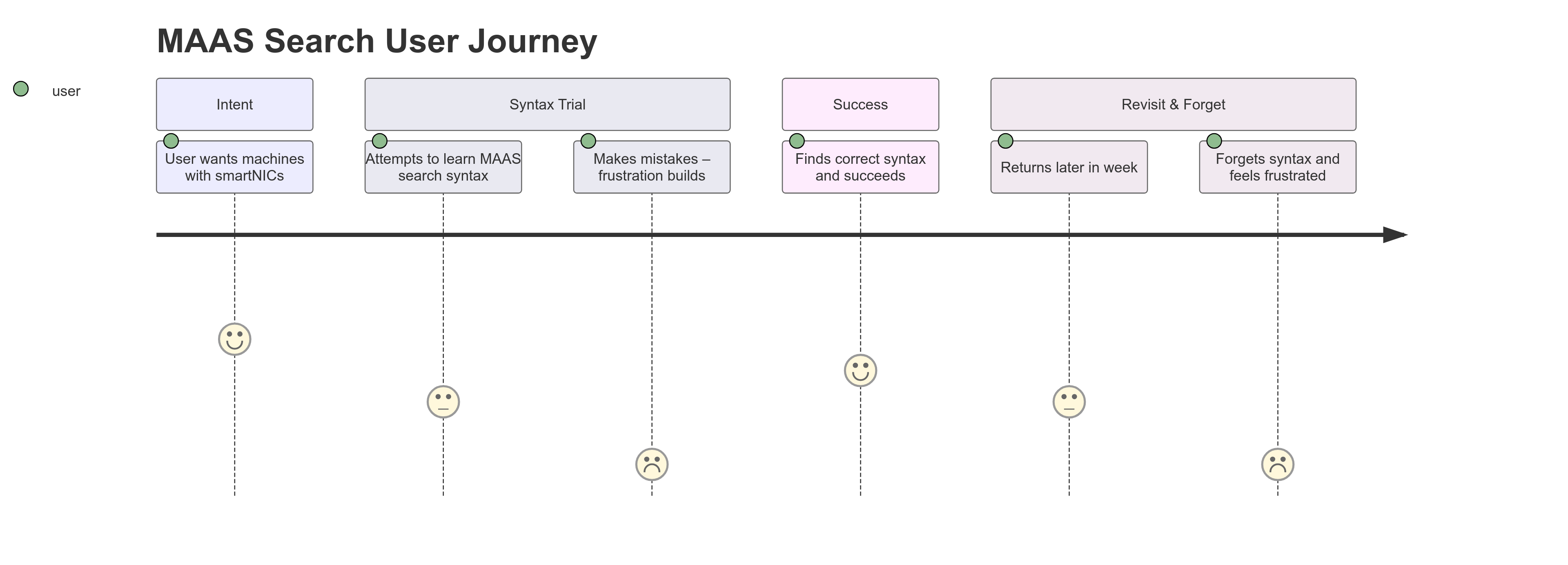
Our biggest problem statements are:
- [Engineering]: We need a way reduce the load time from 2 minutes to 10 seconds for 1000 machines, because as the data center scales the number of machines shouldn’t affect the load time.
- [UX Design]: We need a way to enable people to search without learning the syntax, because the translation step is where people make the most mistakes.
Iteration 1 — Performance First (MAAS 3.0, 2022)
Goal: Reduce load time from 2 mins → 10 secs for 1000 machines
- Moved filtering/grouping to server-side
- Reimplemented WebSocket handlers for machine listing
- Refactored DB queries to avoid unnecessary joins
Impact:
- Achieved 2 secs / 1000 machines (10× faster than goal)
- Exposed DB model inefficiencies → simplified for long-term scalability
The table below shows the estimated Web Socket response time in miliseconds and the total UI load time in relation to the number of machines.
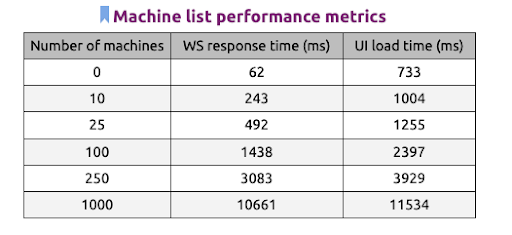
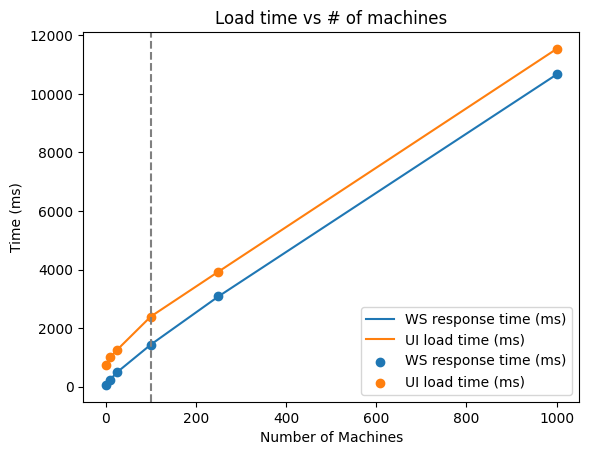
From this graph, we notices that when our user scales their environment to more than 100 machines in their environment, the load time starts to lag. This causes the entire experience to be less motivated.
Exploring different handlers
As an attempt to start fixing our performance, we created a spike to test out different websocket handlers. The following graph shows the timing for getting data for 1000 machines (the whole dataset is from a sample database) with the current implementation websocket handler for the machine listing page.
- The execution time does not include request/response roundtrip nor JSON serialization/deserialization
- Filtering and grouping mechanisms were not taken into account in this experiment.
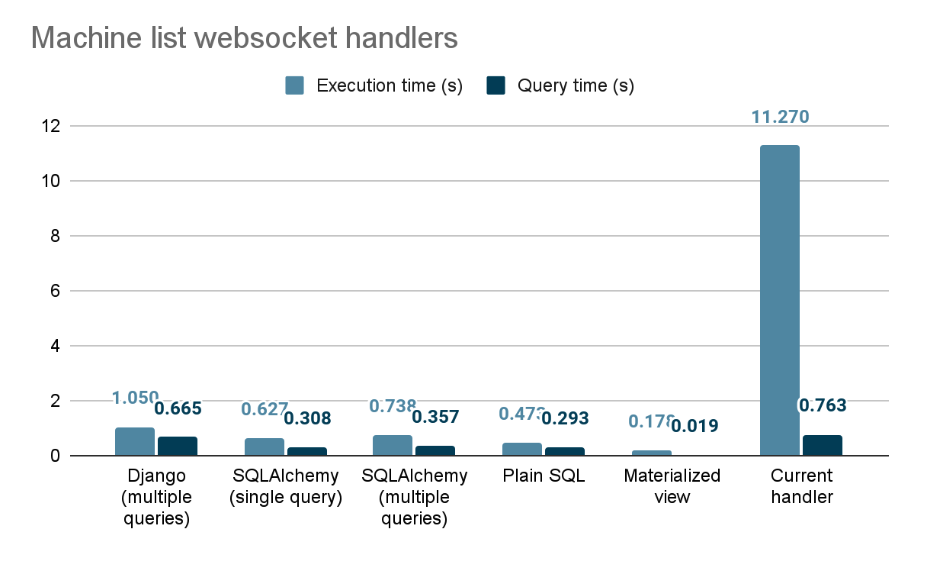
After implementing the websocket handlers and tried executing with different handlers with our client side. The result we as shown on the table below.

Our initial goal:
We want to reduce the load time from 2 mins to 10 secs / 1000 machines
Based on our implementation result:
We reduced the load time from 2 mins to 2 secs / 1000 machines
What did we learn?
- Reimplementing the listing handler exposed that sometimes the database model was incorrect and overly complex, which resulted in slow and confusing queires.
- Data presented on the client side were joined between multiple tables, creating one big object which makes the list API quite expensive. We need the list API to work in a collection basis, which will allow the function to render all machines in one go.
Iteration 2 — Syntax Assistance
With speed solved, we focused on search usability:
- Helper chips with available filters & logical operators (AND/OR/NOT)
- Keyboard-first interactions + free-text search
- Edit/remove chips inline
- Save & share queries + last 5 search history
Exploring different UI interactions
After moving the API calls to the server side, break down the object to fit for its purpose, we started testing out the UI interaction of this search behavior.
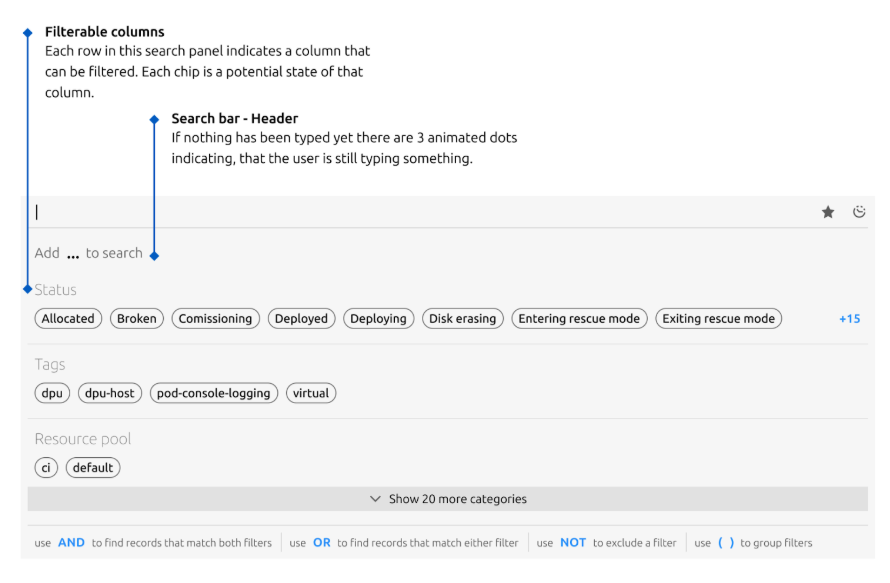
Adding helping texts
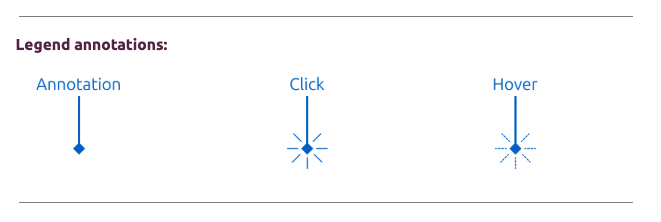
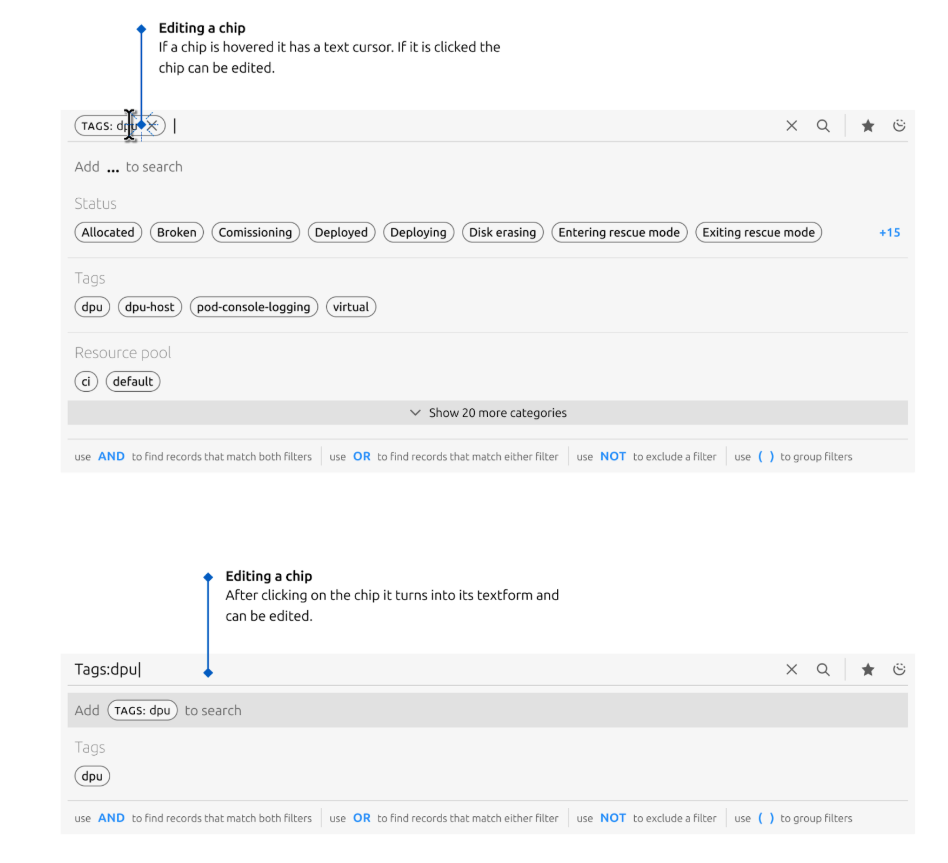
The image below shows the new version of our proposed interaction. Instead of having to learn from the docs page, the available filtering/searching elements will show up as chips sorted alphabetically. It also shows implicit logical operators such as AND, OR, and NOT in the bottom to specify it’s logical order.
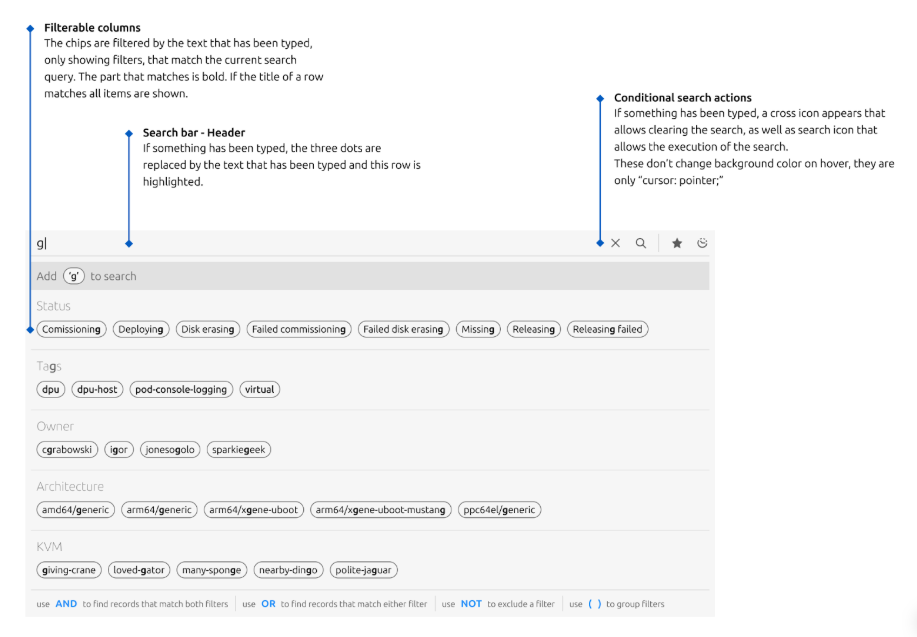
Keyboard interaction and free text search
A user can also type a free text search even when elements in the chips does not exist. This allows people who are proponent to keyboard interaction to search and navigate easily with their keyboards.
Editing and removing chips
A user may edit the chip by clicking on the chip component which will turn into a text format for edit mode. They can also remove the chip by clicking on the X icon on the chip.
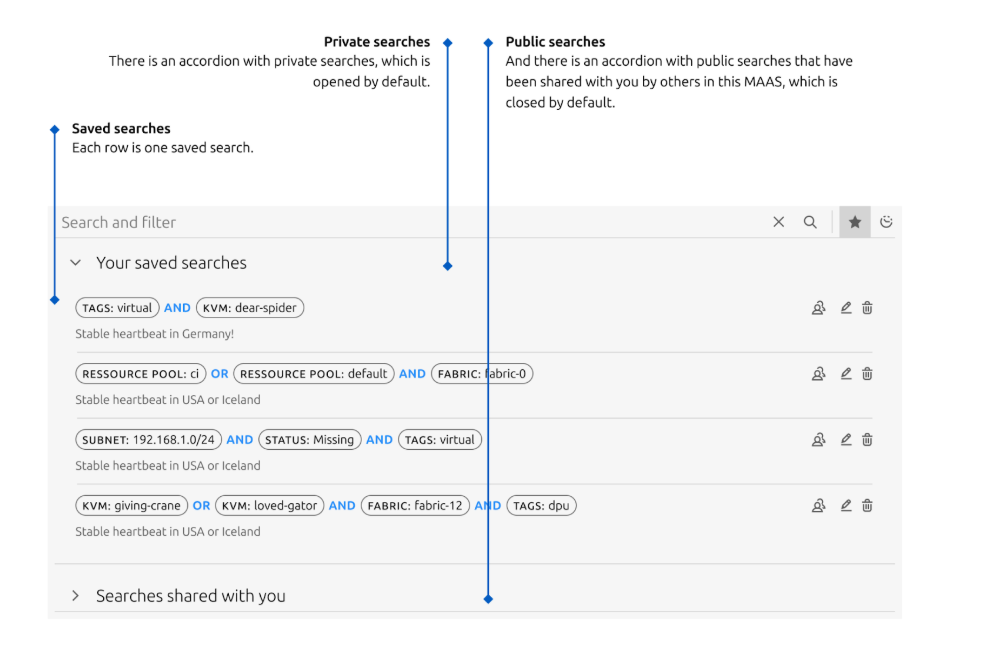
Saving and sharing search
One a search query is constructed, a user have an option to either save the search, share their search or view search queries that are shared with them. They can also retrieve the last 5 historical search queries by clicking on the clock icon.
Testing Results (n=11):
- Easy to learn (
"feels more efficient") but syntax translation mistakes persisted - Save search was a favorite: 9/11 users felt it solved a major pain
- 7/11 still reverted to documentation for syntax help
Insight: Even with UI assistance, manual syntax translation remained a failure point.
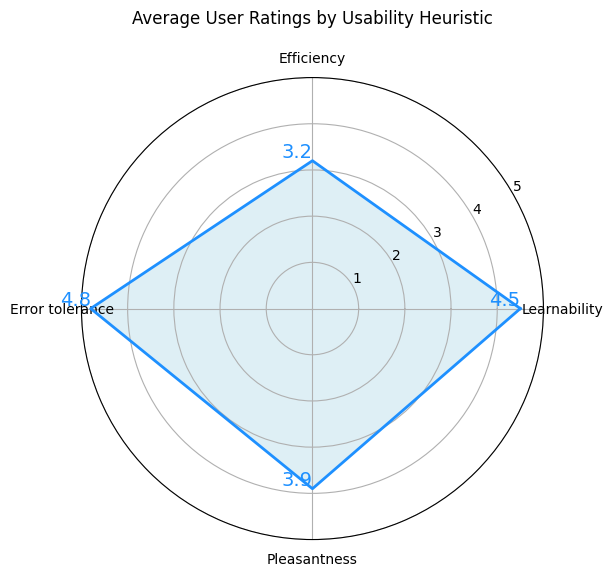
Our test evaluates users based on their feedback and observation of their behavior with a rating of 1 to 5 (highly agreed). We evaluate the interaction based on 4 elements:
- Efficiency - are users able to complete a task without help?
- Learnability - are the language and interaction easy to learn?
- Error tolerance - can a user recover from their mistakes easily?
- Pleasantness - is the design and interaction pleasant to use?
Observation
- Most people find the new experience easy to learn and quoting
it feels more efficient. However, while interacting with the prototype, many users struggles with the interactionswitching between keyboard and mouse. Based on this interaction, we cannot fully conclude that the prototype is more efficient. - Although many users find it
easy to learnthey still need to translate the syntax and creating a logical query which still lead them tomaking many mistakesduring the trial. - The
search saving functionalitywas one of many users’favorite, 9 out of 11 users quoted how they felt this solves their problem because they never remember the syntax and having to relearn this every time.
The problem here is although the UI felt easier to use. People are still making a lot of mistakes during the syntax creation/translation process. And even with all the fancy helper chip, 7 users still go back to the doc to find reference for the syntax.
Iteration 3 — Removing Translation Entirely
Concept: A Natural Language Processing (NLP) layer that converts plain English into valid MAAS DSL queries.
Prototype:
- Built in Python + Streamlit to simulate query parsing
- Designed for ambiguous and partial queries (“all Ubuntu machines not running”)
- Mapped fallback behaviors for underspecified requests
- Created feedback loops to resolve ambiguity before execution
The DSL it had to translate into
To scope the NLP layer, we first had to formalize what the existing DSL actually looked like — it treats every machine attribute as an object, so a query is really a set of attribute filters chained together with logical operators.
# Basic usage
ATTRIBUTE(KEY=VALUE|function() [AND|OR|NOT] KEY=VALUE|function() [AND|OR|NOT] RANGE=[MIN,MAX]|{MIN,MAX})

# Example
status(type="deployed" AND date=[30-05-2024,12-06-2024]) AND hostname(value=contains("us-west-2")) AND storage(size=["2TB","8TB"])

# Multiple values on the same key = OR
ATTRIBUTE(KEY=VALUE1 OR KEY=VALUE2)

# Multiple elements within an attribute
ATTRIBUTE(KEY1=VALUE1 AND|OR|NOT KEY2=VALUE2 AND|OR|NOT KEY3=VALUE3)
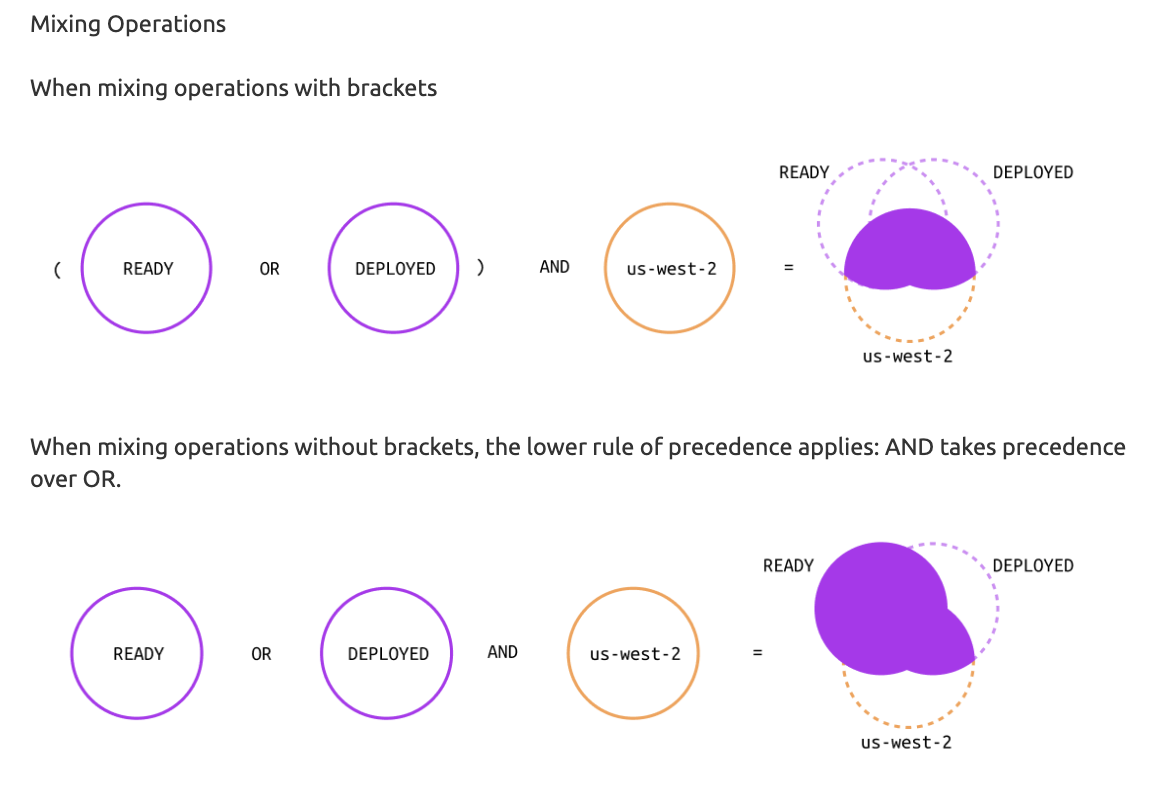
AND, OR, and NOT behave exactly like their set-theory counterparts — which sounds simple until a user has to hold three Venn diagrams in their head just to know whether their query will over- or under-match:
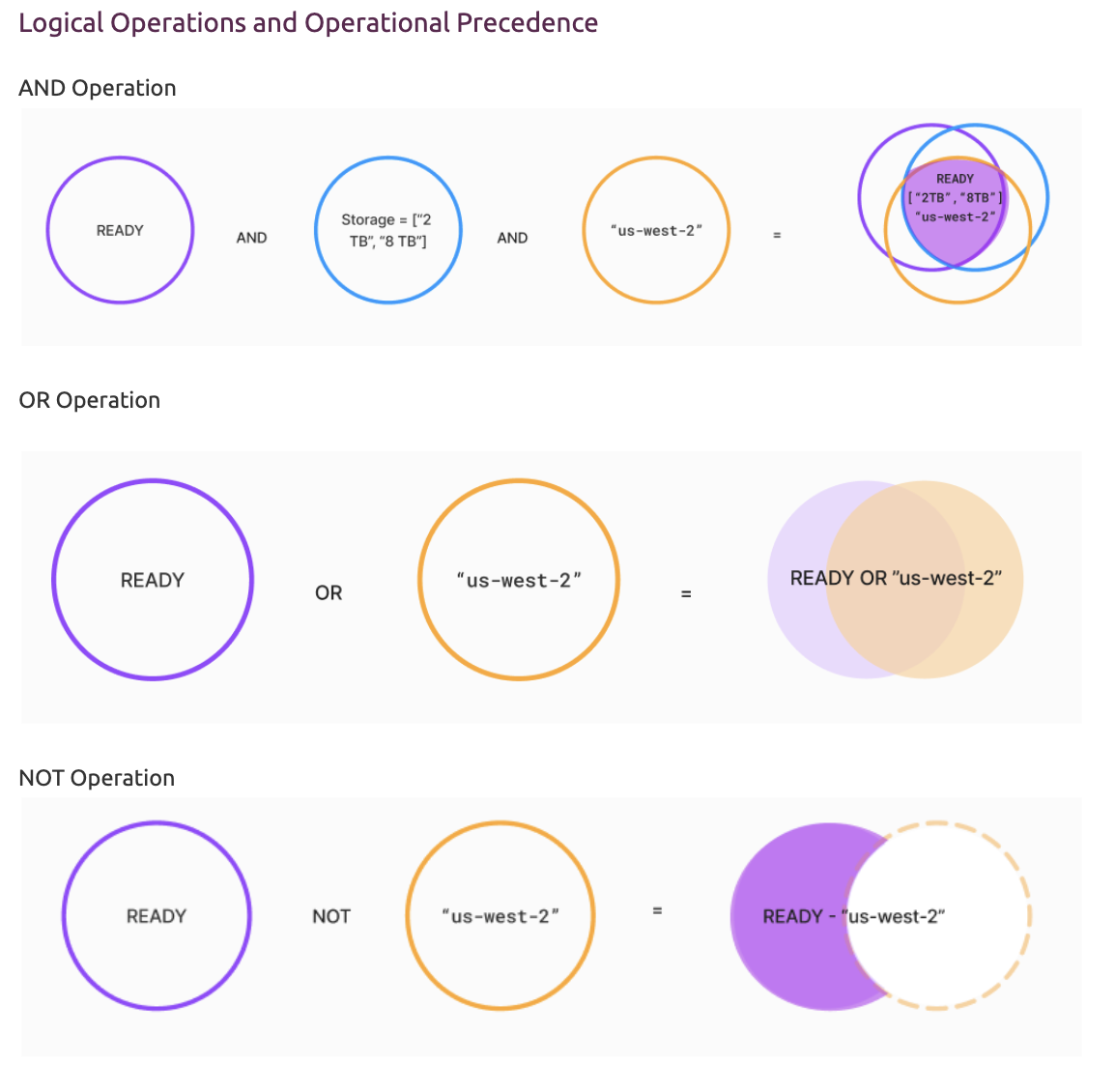
It gets worse once operations start mixing. Without brackets, AND silently takes precedence over OR, so the same clause can resolve to two different result sets depending on whether the user remembered to group it:
Values are typed implicitly, which was itself a source of confusion — a bare number is a number, anything with quotes (or units) is a string, and dates are stored as integers:
count = 2            # number
type = "SSD"          # string
size = "2 TB"          # string, because size carries units
date = 22-05-2024      # date, stored as an integer
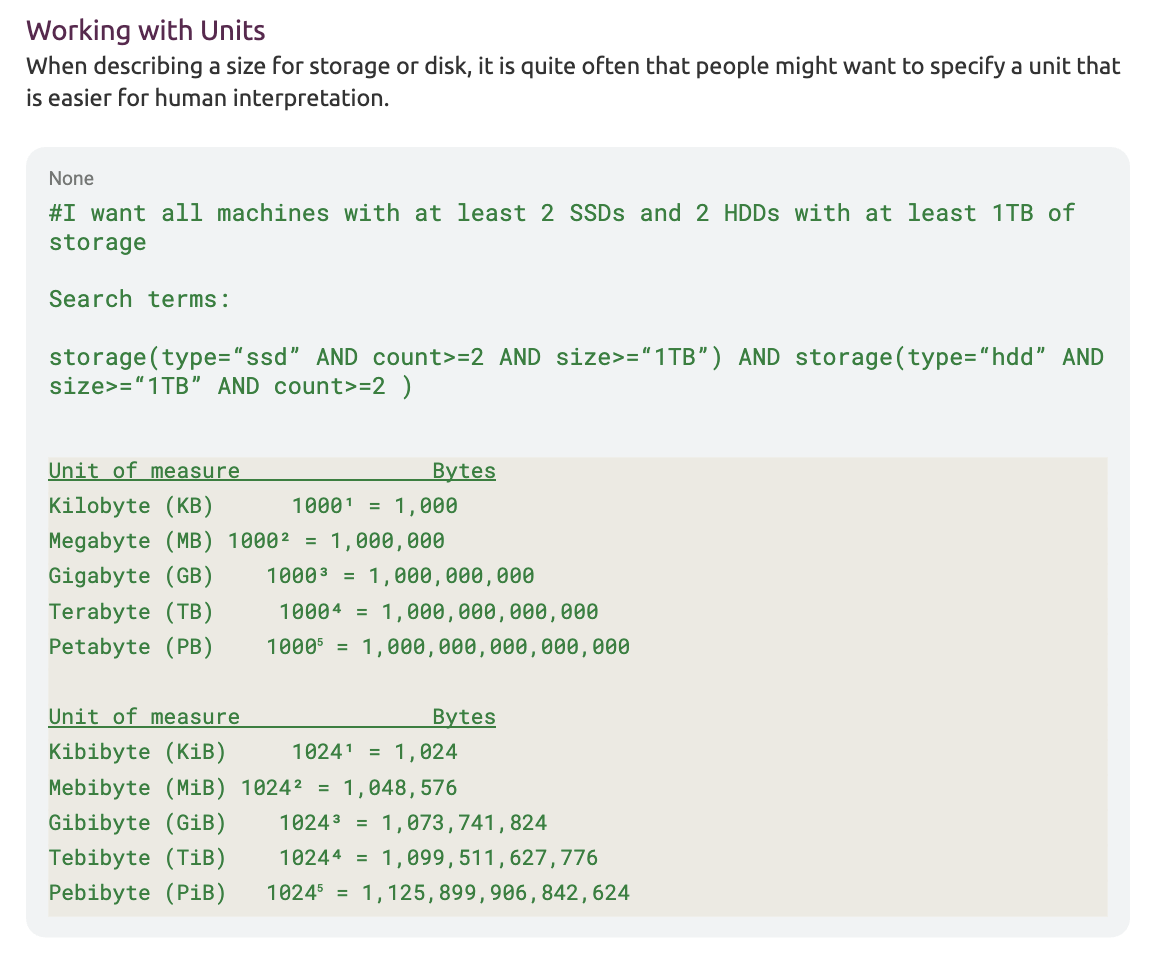
Units compounded the problem further — “2TB” and “2TiB” are not the same number of bytes, and the DSL expected users to know exactly which base (1000 vs. 1024) a given unit implied before their range query would match anything:
A handful of helper functions and range operators extended the grammar further:
# contains() — partial string match
values = contains("sparkiegeek")

# Inclusive range
size = ["2TB","8TB"]
date = [22-05-2023,22-06-2023]

# Exclusive range
size = {"2TB","8TB"}
date = {22-05-2023,22-06-2023}
This is the exact surface area the natural-language layer needed to resolve down to — every “AND vs OR”, every quote, every bracket-vs-brace range was a place a user could get it wrong, and a place the NLP prototype had to get right on their behalf.
What this looked like as real search scenarios
Mapping plain-English requests to this grammar is what the prototype was actually tested against. A few representative scenarios:
-
“Show me machines deployed between May 30th and June 12th 2024, hosted in us-west-2, with 2 to 8 TB of storage.” →
status(type="deployed" AND date=[30-05-2024,12-06-2024]) AND hostname(value=contains("us-west-2")) AND storage(size=["2TB","8TB"]) -
“Any machine with a hostname like sparkiegeek.” →
hostname(value=contains("sparkiegeek")) -
“Machines running either SSD or NVMe storage.” →
storage(type="SSD" OR type="NVMe") -
“Machines with storage strictly between 2TB and 8TB, not inclusive.” →
storage(size={"2TB","8TB"})
These are the same kind of ambiguous, partially-specified requests referenced earlier ("all Ubuntu machines not running") — the prototype had to infer the right attribute, the right operator, and the right value type (string vs. number vs. date) from a sentence that gave none of that explicitly.
Goals:
- Identify reusable search intents across Canonical’s infra products
- Map trade-offs between precision vs ambiguity
- Understand how users phrase queries in natural language
- Build a scalable search model for cross-product reuse
Visit 
[Latest update] We are still testing this out with other MAAS users and other cloud product teams.
Outcomes:
- Reduced wait time from 2 mins to 2 secs for 1000 machines
- Eliminated manual translation: users could search in plain language
- Identified common NLP patterns for future infra-wide search
- Provided design + technical proof for a reusable, human-centric search model
Reflection & Learnings:
- Search at scale is equal parts speed, precision, and cognitive load
- Even “better syntax” is not enough — removing syntax entirely unlocks true usability
- Early prototypes are powerful for testing cross-product scalability
- Collaboration with engineering on backend performance paved the way for UX wins