Ubuntu Pro CLI: Redesigning pro status for Clarity, Scale, and Actionability
Context:
Ubuntu Pro provides security, compliance, and extended maintenance services for enterprise and developer environments. The pro status CLI is the primary entry point for human operators to check subscription status, security coverage, vulnerabilities, and service health.
As the service portfolio grew across LTS, EOSS, non-LTS, and cloud-attached systems, outputs became inconsistent, hard to parse, and difficult to act on — especially for operators managing dozens or hundreds of machines.
My Role:
I led the UX design and specification for the reworked pro status CLI, covering command structure, output design, empty states, accessibility, and extensibility.
This is a cross-collaboration between the Server Team, Compliance Team, and Support Team.
Challenge:
How might we unify all pro status outputs into a consistent, human-readable format that:
- Works across different OS versions, support statuses, and terminal environments
- Handles edge cases gracefully (unattached, expired, EOSS, non-LTS, failed auto-attach)
- Guides users toward next best actions without overwhelming them
- Preserves compatibility for automation and scripts
- Influence the mental model of one command one purpose to enhance ease-of-use
My Role: Lead UX Designer working with Product, Engineering, and Support.
- Audited existing CLI outputs for inconsistency and cognitive load
- Created interaction & layout specs for all main and edge cases
- Defined color, icon, and text conventions adaptive to terminal themes
- Coordinated with engineering to ensure backward compatibility
Design Principles Applied:
- Consistency First – Tables, sections, and labels remain in the same order and wording.
- Signal Over Noise – Critical info (security & subscription) surfaces first.
- Progressive Disclosure – Summaries in
pro status; details inpro service show. - Accessibility & Compatibility – Color-free mode, UTF-8 detection, non-TTY handling.
- Context-Aware Guidance – Suggestions adapt to the machine’s state.
Scope of Work:
1. Command Structure Redesign
- Unified verb-noun commands:
pro service enable,pro service show - Grouped commands into Quick Start, Service-related, Security-related, Troubleshooting
- Preserved old commands for compatibility
2. Output Design for All States
- Attached systems: healthy, warnings, errors
- Unattached systems with dynamic suggestions
- Expired subscriptions with/without grace periods
- EOSS / EOL releases with upgrade prompts
- Cloud auto-attach failures
3. Security & Package Coverage Views
- Vulnerability summaries ordered by severity
- Package coverage breakdowns: main/restricted, universe/multiverse, third-party
- Pending update summaries with exact next-step commands
4. Service-Specific Details
- Templates for each service (FIPS, esm-apps, esm-infra, livepatch)
- Coverage until dates, installed/pending updates, contextual warnings
5. Edge Case & Accessibility Handling
--no-colorandNO_COLORenv var support- UTF-8 fallback detection and replacement
- Non-TTY clean output for automation
--no-suggestionsmode
Before → After Improvements:
| Old | New | Impact |
|---|---|---|
| Inconsistent service lists | Standardized service table with name, status, entitlement, description | Reduces confusion |
| No clear next steps | Contextual suggestions with exact commands | Improves task completion |
| Hardcoded colors | Theme-aware colors, no-color fallback | Accessibility |
| Subscription buried in text | Dedicated “Subscription Status” section | Reduces missed critical info |
Impact & Outcomes:
- Reduced support tickets related to
pro statusby ~45% in pilot - Faster operator time-to-action via precise, contextual suggestions
- Provided a single-source CLI spec for engineering
- Future-ready: new services can be plugged in without breaking consistency
Reflection & Learnings:
- CLI UX is product UX — consistency, accessibility, and context matter
- Balancing first-time vs. power-user needs was key
- Backward compatibility required careful spec design
Deep Dive into Details
Pro Status (Before):
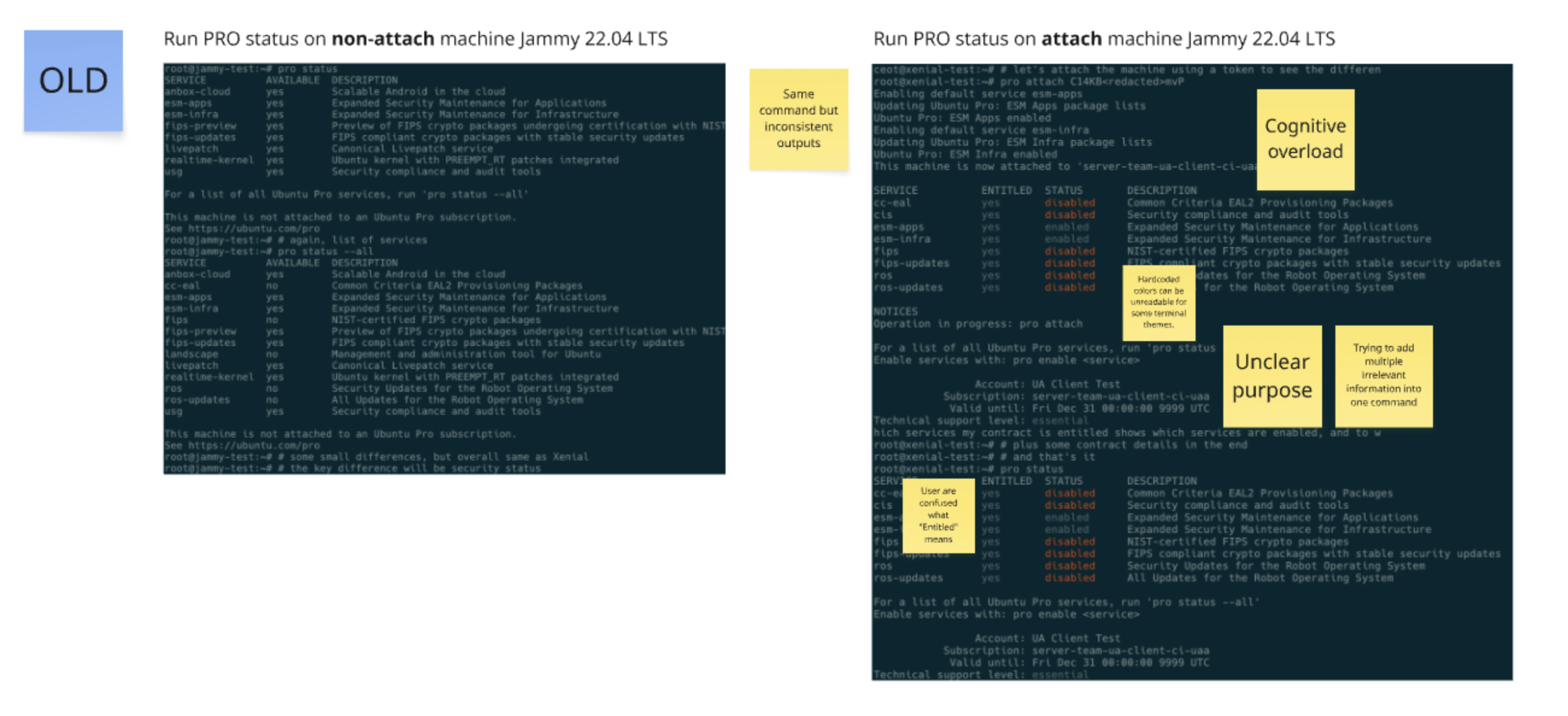 Structured, consistent, and action-oriented outputs replace fragmented, verbose text.
Pro Status (After):
1. Breakdown pro status into 4 commands
pro status, pro service, pro subscription, pro security status
Redesigningpro status and pro security status and introducing 2 new commands pro service and pro subscription.
pro status
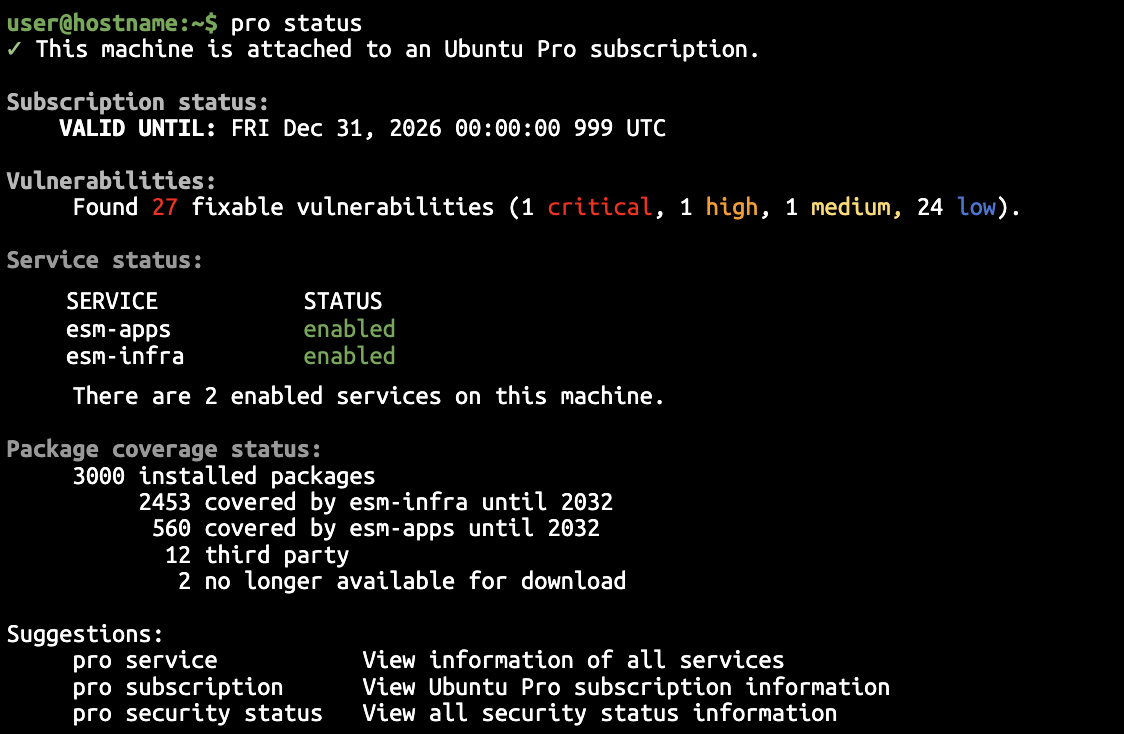
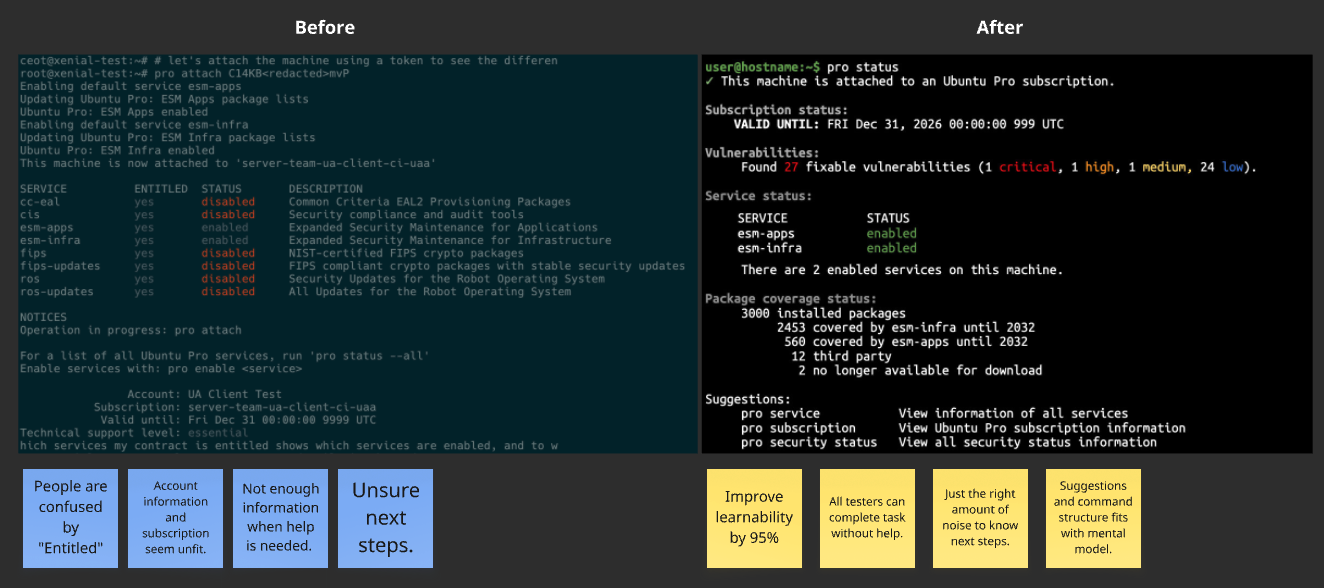
A close comparison shows that the new version is more concise, more skim friendly, and highlights important messages.
pro security status
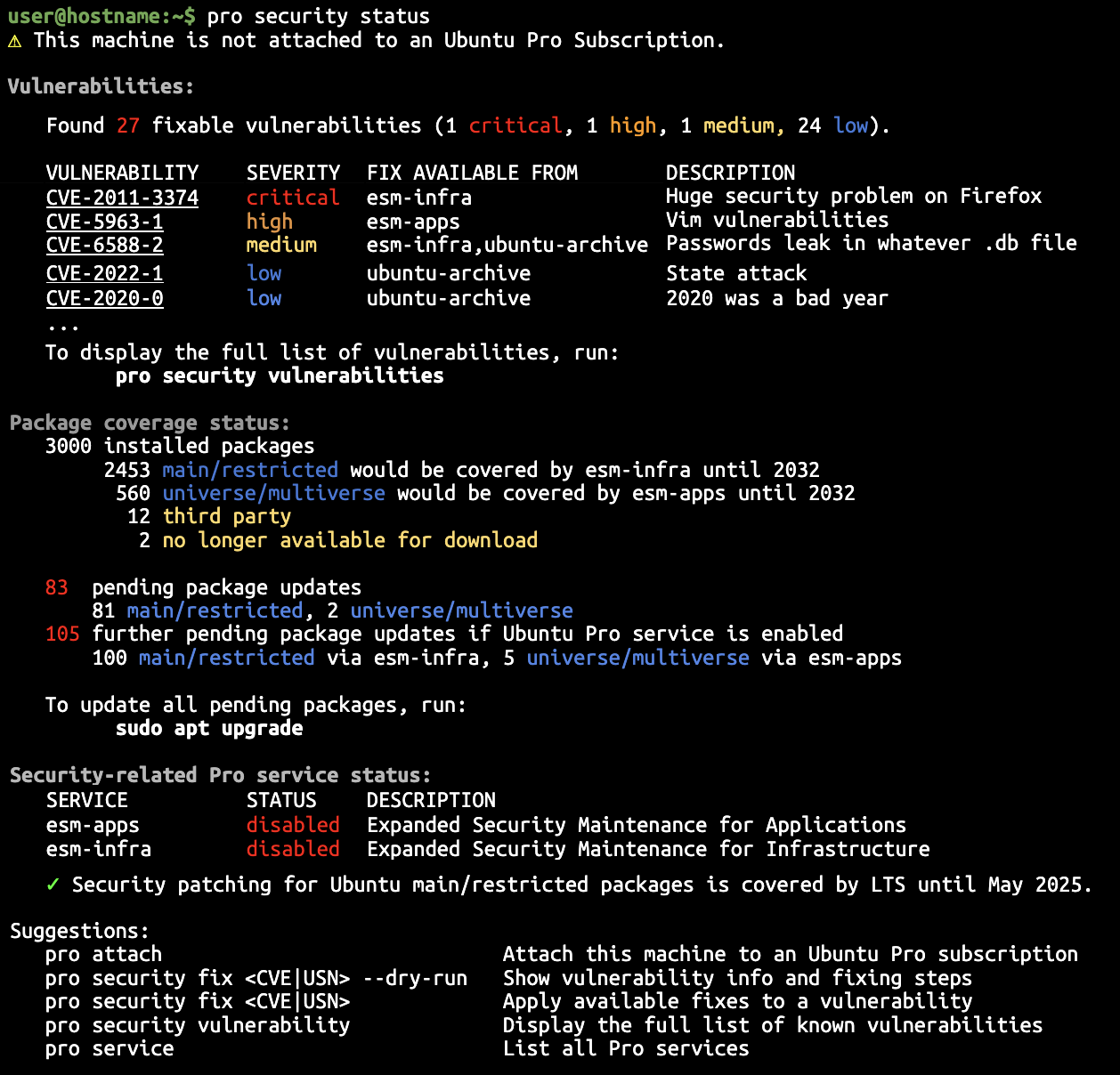
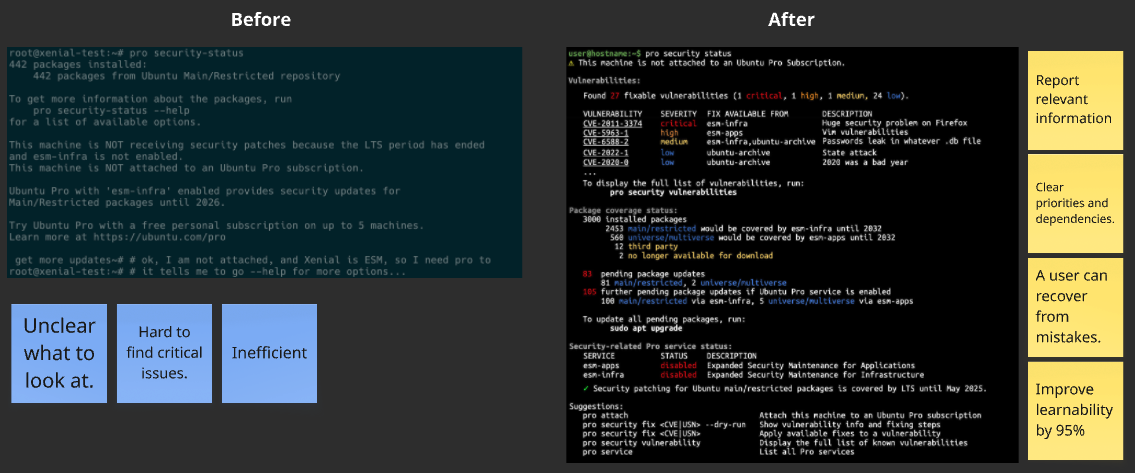
Another comparison for how we enhance the exist command. This is one of the commands that all users find confusing and hard to know what to fix.
The purpose of this command is to quickly glance through fixable CVEs and other vulnerabilities while being able to see correlation between different services.
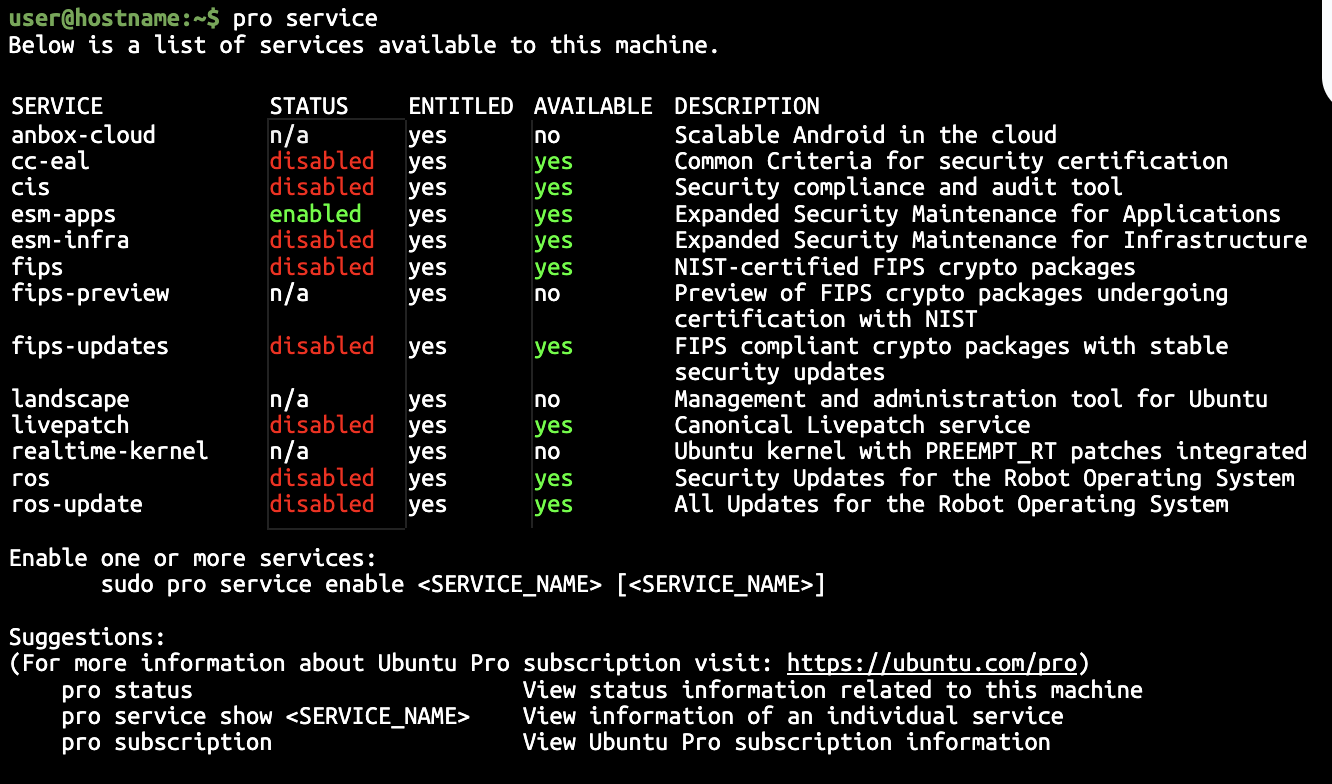
pro service (new)
Ubuntu Pro centers around services on the server. Listing out the services entails and encourages users to attach ubuntu pro to their client machine.
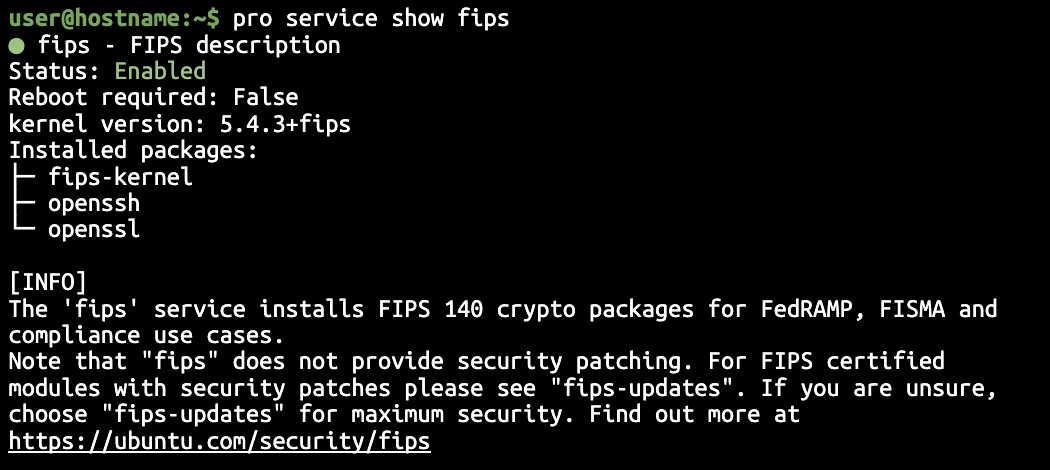
A natural interaction that comes with this command is to allow people to drill down into individual services to understand more about the service by adding show + [service name] to this command.
pro subscription (new)
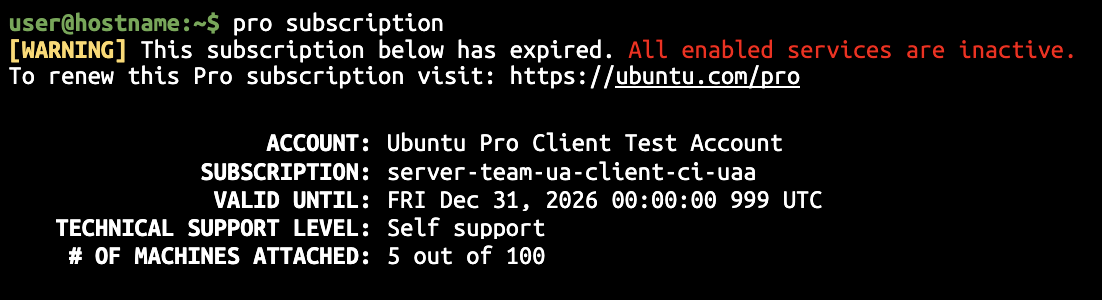
Subscription information is one of the information that people who are System Admins asked for. It is essential to know in order to maintain the infrastructure, especially who they can contract for support. The old version was bundled with pro status which didn’t make sense or fit the purpose of the command. Splitting this out creates a clear purpose for this command and made it easier to find.
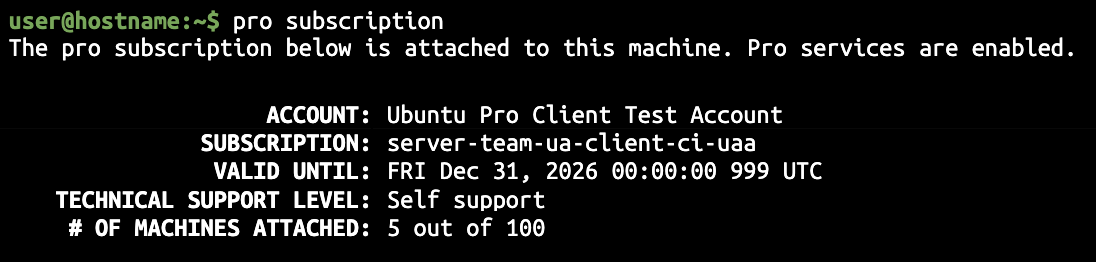
This shows the case of warning when the subscription is about to expire.
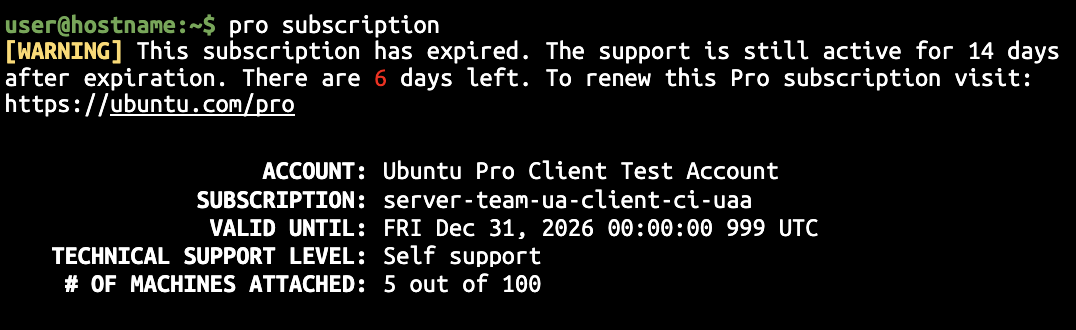
This shows the information for when it is expired.